Summary
The WAWC Cost report shows Washington workers' compensation cost totals based on payroll activity in a selected date range. It helps teams review hours, rates, and cost amounts by office and workers' compensation class so they can track cost exposure before reconciliation and compliance review.
This report supports two date views: accounting period date or check date. It also supports optional archived data inclusion, so teams can review both current and archived payroll activity when needed.
This report is essential for:
Payroll Teams: reviewing payable hours and workers' compensation cost totals before reconciliation.
Finance Teams: Establishing labor-related insurance costs for period-end reporting.
Risk and Compliance Teams: monitoring Washington workers' compensation cost behavior by class code.
Office Leaders: Comparing cost patterns across office locations.
The business outcome is more accurate about cost visibility and faster review of workers' compensation expense drivers.
Report Overview
Attribute | Details |
Purpose | Summarizes Washington workers' compensation costs by office and workers' compensation class for a selected period. |
Classification | Compliance Report / Financial Report |
Who Should Use This Report | Payroll Managers, Finance Teams, Risk & Compliance Teams, Office Managers |
Business Problem Solved | Gives one place to review workers' compensation cost totals tied to payroll activity. |
Run Frequency | On demand (commonly weekly, monthly) |
Related Reports | Worker Comp Cost, Worker Cost Summary by Customer, Worker Cost Summary Report |
Business Value
Category | Description |
Cost Control | Highlights where workers' compensation costs are increasing by office and class. |
Compliance Readiness | Supports Washington state workers' compensation review activities. |
Reconciliation Support | Helps teams compare expected cost totals with downstream billing or statements. |
Audit Support | Provides a consistent period-based view of hours, rates, and cost amounts. |
Historical Analysis | Allows optional archived data inclusion for broader trend analysis. |
Known Issues or Limitations
Issues | Description |
Washington-only scope | The report includes only Washington workers' compensation records. |
Payroll-type exclusions | Certain earnings are intentionally excluded from this report. |
Finalized payroll requirement | Records are included only when payroll is finalized. |
Access-based visibility | Company and office visibility follow each user's access rights. |
Rate timing dependency | Cost uses rates active during the selected date range, so historical rate updates can affect rerun comparisons. |
Troubleshooting Guide
Issues | Problem Reason | Solution |
No rows returned | Filters are too narrow, or no finalized payroll exists in the selected period. | Expand dates, confirm date type selection, and confirm payroll is finalized. |
Missing office data | The office is outside the selected filter or outside your access scope. | Verify the office filter and data access. |
Totals lower than expected | Excluded earning types or zero hour lines are not counted. | Review whether those entries should be included in this report type. |
Results differ between runs | Archived data options or date type changed, or applicable rates differ by period. | Re-run with identical parameters and confirm archived data and date type settings. |
FAQ
Questions | Answers |
Is this report limited to Washington? | Yes. It is specifically designed for Washington workers' compensation for cost reporting. |
Which date should I use? | Use accounting period date for period-based accounting review or check date for payment-date review. |
What does Include Archived Data do? | It adds matching archived payroll records to the same output when set to Yes. |
Why are some earnings not included? | The report intentionally excludes specific non-standard earning types to focus on supported workers' compensation costing lines. |
Why can't I see all the offices? | Office/company options are limited to your user account that is allowed to be accessed. |
Reference Video/Screenshot
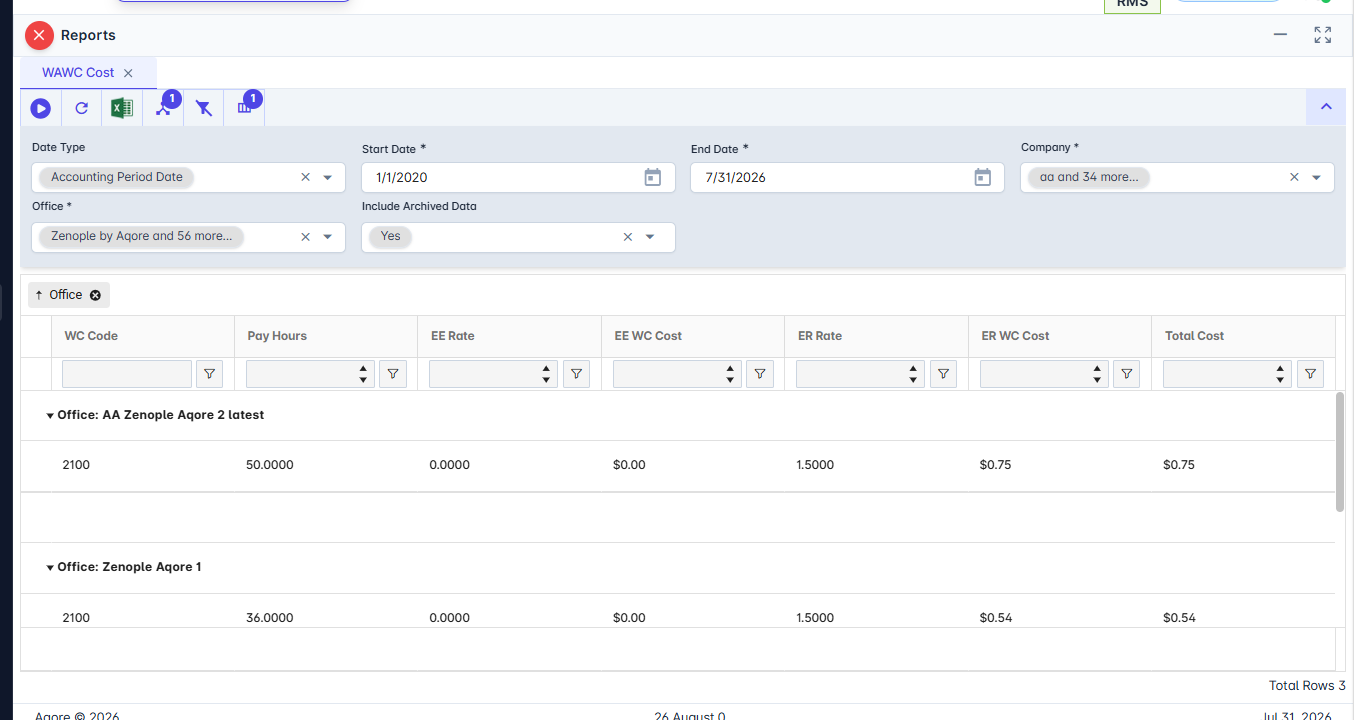
Report Details
Category | Value |
Parent Category | Back Office |
Category | Accounting/GL |
Report Type | Spreadsheet Report |
Report runs from Application | Reports (RMS) |
Report Category | Shareable |
Report Level | Office |
Report Parameters
Report Parameter | Description | Parameter Options | Default | Required |
Date Type | Chooses which payroll date context drives filtering. | Accounting Period Date, Check Date | No | |
Company | Limits results to one or more companies. | Multi-select list or All | All | Yes |
Office | Limits results to one or more offices. | Multi-select list or All | All | Yes |
Start Date | Beginning date for report filtering. Example: 07/01/2026. | Date picker | Yes | |
End Date | End date for report filtering. Example: 07/31/2026. | Date picker | Yes | |
Include Archived Data | Includes archived payroll records in addition to current records. | Yes / No | No | No |
Report Grouping
The report produces one row per unique combination of:
Office (the operating office tied to the payroll record)
WC Code (the workers' compensation class code used for costing)
Employee Rate (the employee-side workers' compensation rate used for that class)
Employer Rate (the employer-side workers' compensation rate used for that class)
Each row represents payroll hours and workers' compensation costs for one office and class/rate combination within the selected period.
Report Columns
Report Column | Description | Definitions/Logic |
Office | Office associated with payroll activity. | Use the office tied to each eligible payroll line within the selected filters. |
WC Code | Workers' compensation class code for costing. | Use the class code associated with the payroll transaction. |
PayHours | Total payable hours included in the report row. | Sums eligible payroll hours for the same office, class code, and rate combination. |
EERate | Employee-side workers' compensation rates. | Use the active employee-side rate for the class during the selected date range. |
EEWCCost | Employee-side workers' compensation cost amount. | Multiplies included hours by the employee-side rate and then total the result. |
ERRate | Employer-side workers' compensation rate. | Use the active employer-side rate for the class during the selected date range. |
Office | Office associated with payroll activity. | Use the office tied to each eligible payroll line within the selected filters. |
Additional Notes
The report includes only Washington state workers' compensation records. |
It includes only earnings-category payroll lines and excludes selected non-standard earning types. |
Lines with zero payable hours are excluded from costing. |
Only finalized payroll activity is included in the report’s output. |
Company and office options automatically reflect the logged-in user's access permissions. |