Summary
The Worker Comp Cost Report provides a payroll-period view of workers’ compensation exposure and cost by company, office, customer, employee, and WC classification. It helps teams understand how gross wages are distributed across regular, overtime, double-time, and other wage components, and how those wages translate into WC wage base and WC cost.
This report is essential for:
Payroll teams: Review payroll wage mix and workers’ compensation impact for closed batches.
Finance teams: Track total WC cost by company and state for cost control and accrual planning.
Operations and compliance teams: Validate WC code usage and state allocation for audit readiness.
It delivers clear, grouped totals (company, state, and grand total) so stakeholders can reconcile WC cost consistently across payroll runs.
Report Overview
Attribute | Details |
Purpose | Show worker compensation wage/cost details and totals across payroll transactions. |
Classification | Financial / Compliance Report |
Who Should Use This Report | Payroll, Finance, Operations, Compliance |
Business Problem Solved | Provides one view to analyze WC wages, rates, and costs with rollups by company and state. |
Run Frequency | On-demand (typically per payroll cycle) |
Related Reports | Payroll Register, Payroll Journal, Payroll Register Detail |
Business Value
Category | Description |
Cost Visibility | Shows the direct WC cost impact tied to payroll transactions. |
Compliance Support | Helps verify WC code and state-based reporting accuracy. |
Reconciliation | Includes company totals, state totals, and grand totals for quick balancing. |
Operational Insight | Surfaces where wage categories (regular/OT/DT/other) are driving WC cost. |
Multi-Entity Control | Supports filtering by company, office, and customer for targeted analysis. |
Known Issues or Limitations
Issues | Description |
Closed payroll only | The report includes only transactions from finalized payroll batches. |
Non-zero gross filter | Records with zero gross wages are excluded. |
Customer name filter behavior | Customer filtering uses partial-text matching, which may return broader results if search text is generic. |
State filter casing dependency | If the state input value is not aligned with expected formatting, users may need to reselect from UI filters. |
Employee-only scope | Data is restricted to employee transaction types for WC calculations. |
Troubleshooting Guide
Issues | Problem Reason | Solution |
No data returned | Date range, company/office filters, or customer filter is too restrictive | Expand filters and confirm payroll exists in the selected period |
Missing expected payroll row | Payroll batch is not finalized or gross wage is zero | Confirm the payroll run is finalized and contains non-zero gross |
Worksite address appears blank | Worksite address was not available on the original transaction link | Confirm location setup for the worker/job and rerun report |
Totals look lower than expected | Only employee records and qualified wage components are included | Validate that contractor or excluded transaction types are not expected in this report |
State rollup not as expected | State filter selection or WC-state mapping is incomplete | Verify selected states and WC setup for impacted records |
FAQ
Questions | Answers |
What date basis can I use? | You can run the report by accounting period date or by check date. |
Does the report include all payroll statuses? | No. It includes only finalized payroll batches. |
How is “Other Wages” calculated? | It is derived from non-regular payroll components such as other pay, holiday pay, and PTO pay. |
Why do I see WC code text in one field? | The report shows WC code along with its description for easier review. |
Can I get company and state totals in one run? | Yes. The report outputs detail rows plus company, state, and grand totals. |
Reference Video/Screenshot
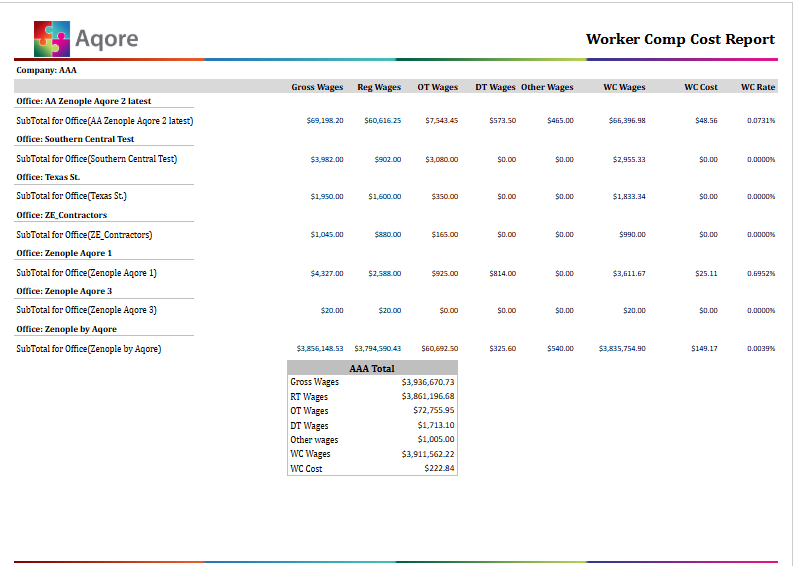
Report Details
Category | Value |
Parent Category | Back Office |
Category | Accounting/GL |
Report Type | Paginated Report |
Report runs from Application | RMS |
Report Category | Shareable |
Report Level | Transaction |
Report Parameters
Report Parameter | Description | Parameter Options | Default | Required |
Date Type | Determines which date basis is used for filtering records. | Accounting Period Date, Check Date | Accounting Period Date | Yes |
Start Date | Beginning of report date range. | Date picker | — | Yes |
End Date | End of report date range. | Date picker | — | Yes |
Company | Limits output to one or more companies, or all accessible companies. | All or multi-select company | All | Yes |
Office | Limits output to one or more offices, or all accessible offices. | All or multi-select office | All | Yes |
Customer | Filters by customer name text. | Search by text field | % (all) | No |
State | Limits results to one or more states, or all. | All or multi-select states | All | No |
Group By | Report grouping preference input. | Multiselect grouping based on office, customer, state, wc code and employee | Office | No |
Report Grouping
The report is by default grouped as per company.
The report has Group By parameter with options like Office, Customer, State, WC Code and Employee for dynamic grouping.
Report Columns
Report Column | Description | Definitions/Logic |
Company | Company alias/name in report output | Derived from the worker’s associated company context |
Office | Office name tied to the payroll record | Pulled from office mapping of the transaction |
Customer | Customer/company name tied to assignment or transaction snapshot | Taken from transaction snapshot context |
Employee | Worker display name | Taken from transaction snapshot |
WC Code | WC code with description | Built as “Code - Description” from WC setup |
Gross Wages | Gross wages for employee transaction | Pulled from payroll finance amounts |
Reg Wages | Regular wage base | Regular pay plus salary components |
OT Wages | Overtime wage amount | Overtime pay component |
DT Wages | Double-time wage amount | Double-time pay component |
Other Wages | Additional wage components | Sum of other pay, holiday pay, and PTO pay |
WC Wages | WC wage base amount | Pulled from payroll finance WC wage value |
WC Rate | WC rate used in cost calculation | Pulled from payroll finance WC rate |
WC Cost | Calculated workers’ compensation cost | Pulled from payroll finance WC cost |
State | State associated with WC classification | Derived from WC/state mapping |
Additional Notes
Only finalized payroll batches are included to ensure stable financial reporting. |
The report excludes records where gross wages are zero. |