Summary
The Transaction with Payroll and Invoice Details report gives a line-by-line view of payroll check data and matching invoice data for the same work transactions. It helps teams trace what was paid, what was billed, and how those amounts connect for a selected period.
This report is essential for:
Payroll Teams: reviewing check totals, taxes, deductions, and net pay at transaction level.
Billing and Finance Teams: reconciling billed totals, invoice balances, and related adjustments.
Operations and Audit Teams: validating payroll-to-invoice consistency and identifying mismatches quickly.
Report Overview
Attribute | Details |
Purpose | Produces transaction-level payroll and invoice detail for reconciliation and audit review. |
Classification | Financial Report |
Who Should Use This Report | Payroll Teams, Billing Teams, Finance Teams, Operations Teams |
Business Problem Solved | Reduces manual effort to match payroll checks to invoices and verify billed vs. paid data. |
Run Frequency | On-demand; commonly run during payroll close and invoice review cycles |
Related Reports | Payroll Register, Invoice Summary, Transaction Detail Reports |
Business Value
Category | Description |
Payroll-to-Billing Trace | Shows payroll and invoice information together so users can trace both sides in one place. |
Faster Reconciliation | Helps finance teams resolve differences in billed and paid amounts without exporting multiple reports. |
Adjustment Visibility | Includes adjustment hours and adjustment amounts to support correction tracking. |
Charge and Tax Visibility | Separately surfaces charges and sales tax values for clearer bill-side review. |
Audit Readiness | Provides transaction-level detail that supports internal reviews and external audit preparation. |
Known Issues or Limitations
Issues | Description |
Date Type drives included rows | Results depend on whether users select Accounting Period Date or Check Date. |
Customer filter is text-based | Customer filtering uses a text match; partial names can return broader results than expected. |
Access-based data visibility | Company and Office results are limited by the logged-in user's data access permissions. |
Zero-value transactions hidden | Transactions with both bill and pay totals as zero are not included in the output. |
Archived option may run slower | Including archived data can increase run time because the report combines live and archived records. |
Troubleshooting Guide
Issues | Problem Reason | Solution |
No rows returned | Date range, filters, or data access scope do not match available transactions. | Recheck Date Type, Start Date, End Date, Company, and Office filters, then run again. |
Too many customers in results | Customer filter uses partial text matching. | Enter a more specific customer name or narrow with Company and Office filters. |
SSN appears masked | User permission does not allow full SSN view. | Request appropriate permission from your administrator if full SSN access is required. |
Totals look higher than expected | Archived records were included, or multiple transaction lines exist per invoice. | Set Include Archived Data to No for live-only review and validate grouping expectations. |
FAQ
Questions | Answers |
Should I use Accounting Period Date or Check Date? | Use Accounting Period Date for period-based financial review, and Check Date for payment timing review. |
What does Include Archived Data do? | It adds eligible historical archived transactions to the same report output. |
Why do I see multiple rows for one invoice? | The report is transaction-level, so one invoice can appear on multiple rows when it includes multiple checks or workers. |
Why is a worker's SSN not fully visible? | SSN display follows your security permission settings. Users without full access see a masked value. |
Can I run this report for all companies and offices? | Yes, but only for organizations and offices you are authorized to access. |
Reference Video/Screenshot
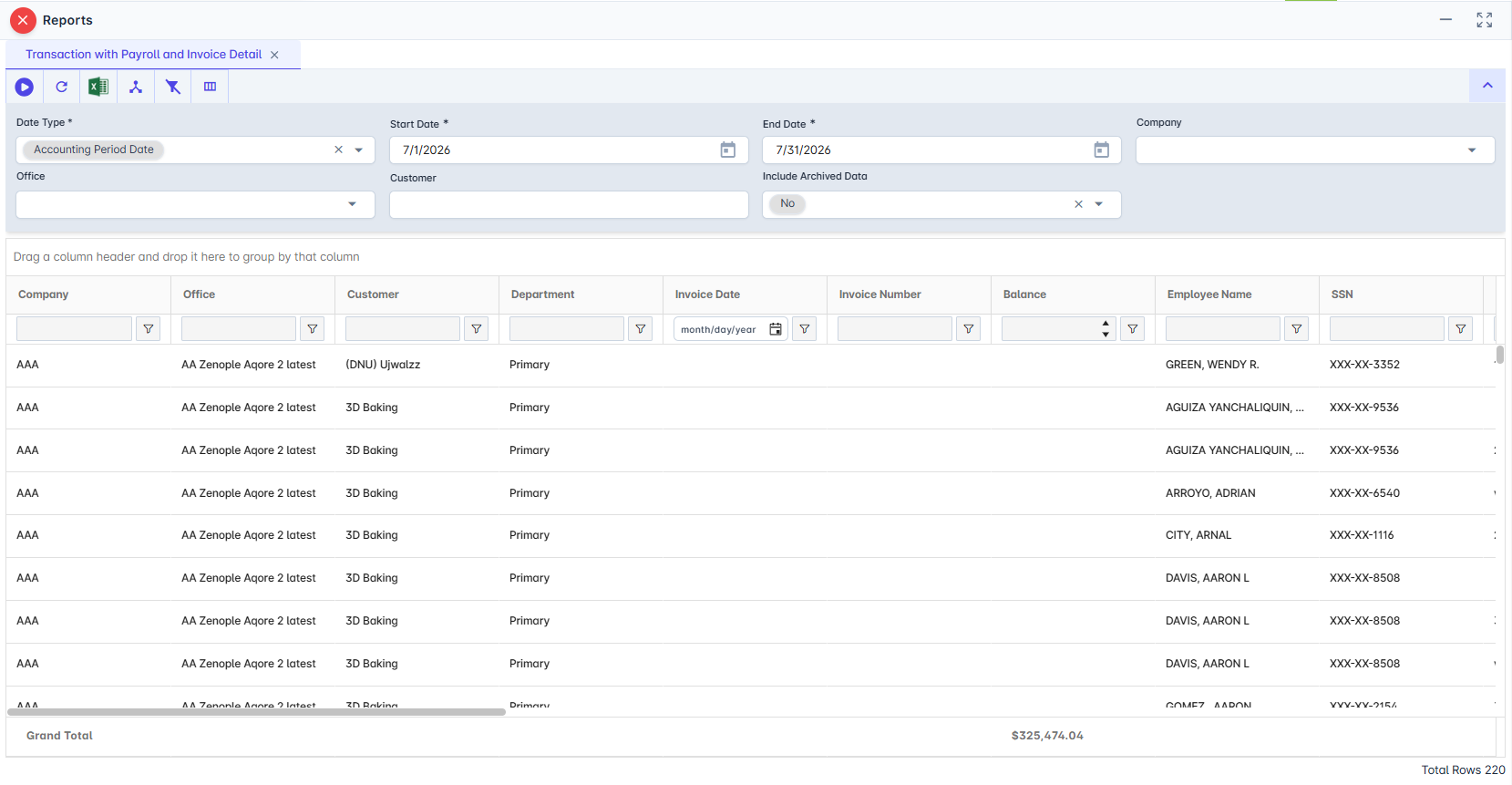
Report Details
Category | Value |
Parent Category | Back Office |
Category | Accounting/GL |
Report Type | Spreadsheet |
Report runs from Application | RMS |
Report Category | Shareable |
Report Level | Transaction |
Report Parameters
Report Parameter | Description | Parameter Options | Default | Required |
Date Type | Selects which date basis the report uses to include records. Example: Check Date. | Dropdown (Accounting Period Date, Check Date) | — | Yes |
Start Date | Start of the reporting period. Example: 07/01/2026. | Date picker | — | Yes |
End Date | End of the reporting period. Example: 07/31/2026. | Date picker | — | Yes |
Company | Limits results to selected company or companies. | Multi-select list | All accessible companies | No |
Office | Limits results to selected office or offices. | Multi-select list (depends on Company) | All accessible offices | No |
Customer | Filters by customer name text. Example: Acme Staffing. | Text field | — | No |
Include Archived Data | Includes archived historical records in addition to live records. | Dropdown (Yes, No) | No | No |
Report Grouping
The report does not include any groupings.
Report Columns
Report Column | Description | Definitions/Logic |
Company | Company related to the transaction. | Taken from the company alias linked to the office on the transaction. |
Office | Office where the transaction belongs. | Taken from the transaction's office information. |
Customer | Customer tied to the transaction. | Taken from the customer linked to the transaction. |
Department | Department associated with the transaction. | Taken from the transaction snapshot department value. |
Invoice Date | Date the invoice batch was issued. | Pulled from the invoice batch for the linked invoice. |
Invoice Number | Invoice number for the billed transaction. | Pulled from the linked invoice record. |
Balance | Remaining invoice balance. | Pulled from the invoice balance amount and summarized by the output grouping. |
Employee Name | Worker name for the payroll transaction. | Pulled from the worker profile linked to the transaction. |
SSN | Worker SSN display value. | Shows full or masked value based on the current user's SSN permission. |
Check Number | Payroll check number. | Pulled from the linked payment record. |
Check Date | Date of the payroll check batch. | Pulled from the linked payroll batch date. |
Total Bill | Total billed amount. | Summed from transaction bill totals within each output group. |
Total Bill Hours | Total bill hours. | Summed from transaction bill hours within each output group. |
Total Pay Hours | Total paid hours. | Summed from transaction pay hours within each output group. |
Total Adjustment Pay Hours | Total adjustment pay hours. | Summed from adjustment-type transaction items linked to the transaction. |
Total Adjustment Bill Hours | Total adjustment bill hours. | Summed from adjustment-type transaction items linked to the transaction. |
Adjustment Bill | Total adjustment bill amount. | Summed adjustment bill amounts from adjustment-type transaction items. |
Adjustment Pay | Total adjustment pay amount. | Summed adjustment pay amounts from adjustment-type transaction items. |
Charge | Total additional charge amount. | Summed from transaction item charge records linked to the transaction. |
Sales Tax | Total sales tax amount. | Summed from transaction item sales tax records linked to the transaction. |
Gross | Gross pay amount. | Pulled from payroll transaction finance values and summarized by output group. |
Tax | Payroll tax amount. | Calculated from payment tax amount prorated to the transaction and then summarized. |
Deduction | Payroll deduction amount. | Calculated from payment deduction amount prorated to the transaction and summarized. |
Benefit | Payroll benefit amount. | Calculated from payment benefit amount prorated to the transaction and summarized. |
Net | Net pay amount. | Calculated from payment net amount prorated to the transaction and summarized. |
DD | Direct deposit flag. | Shows Yes when paid by direct deposit; otherwise No. |
Check Status | Status of the payroll check. | Pulled from the check status label on the linked payment record. |
Additional Notes
This is a transaction-level report, so the same invoice can appear multiple times when it includes multiple payroll lines. |
Include Archived Data = Yes combines eligible live and archived records in one output. |
Company and Office defaults follow the current user's data access scope when those filters are left blank. |
For customer filtering, use specific names to avoid broad partial-match results. |
Gross is shown for employee payroll rows and may be zero for non-employee transaction types. |