Summary
The Payroll Journal Report gives a full picture of every paycheck processed in a pay cycle; showing how much each worker earned, what taxes and deductions were taken out, and what the final net pay was. It is the definitive reference document for reconciling payroll before funds are released.
At a glance, the report shows Regular, Overtime, PTO, Holiday, and Double-Time hours worked alongside the dollar amounts for gross wages, all tax withholdings, deductions, and net pay; broken down by individual check and summarized at the office and company level.
This report is essential for:
Payroll & Accounting Teams: confirming that every employee was paid correctly and that taxes, garnishments, and benefits deductions were applied as expected before closing the payroll batch.
Finance Managers: reconciling total payroll cost by office or company against the general ledger.
HR & Compliance Teams: verifying Direct Deposit vs. Live Check counts and amounts, and auditing deduction accuracy.
By using this report, staffing agencies maintain tight control over payroll accuracy, reduce post-close corrections, and ensure every worker and every obligation is properly accounted for.
Report Overview
Attribute | Details |
Purpose | Provides a detailed, transaction-level view of payroll activity including gross wages, tax withholdings, deductions, hours by type, and net pay. Summarized at both the office and company level. |
Classification | Business-Critical Report |
Who Should Use This Report | Payroll and Accounting Teams, Finance Managers, HR and Compliance Teams |
Business Problem Solved | Enables complete payroll reconciliation by showing exactly what each employee was paid, what was withheld, and what was deposited or printed as a check — before and after payroll close. |
Run Frequency | Every pay cycle (weekly or biweekly) also run on demand during audits or when investigating payroll discrepancies |
Related Reports | Payroll Register, Payroll Register Detail |
Business Value
Category | Description |
Payroll Reconciliation | Confirms gross pay, taxes, deductions, and net pay match expected amounts before the batch is closed and funds are released. |
Check Distribution Audit | Shows the split between Direct Deposit and Live Check counts and net amounts, making it easy to verify bank file totals. |
Tax Compliance | Breaks out every employee tax type (Federal, State, FICA, Medicare, Local) so withholding accuracy can be confirmed at a glance. |
Hours Validation | Displays Regular, OT, PTO, Holiday, and Double-Time hours per check, supporting timesheet-to-paycheck verification. |
Deduction Verification | Itemizes garnishments, health insurance, and other deductions so HR and payroll can confirm benefit deductions are correct. |
Known Issues or Limitations
Issues | Description |
Voided checks included in totals | Voided checks appear in the report and are included in the Check Count and gross totals. Users should note that Net for voided checks represents the original check value and does not reduce the branch net. |
Other deduction may include negative values | The Other column can display negative amounts when reimbursements or credits are applied as transaction-level deductions. This is expected behaviour. |
Report does not cover employer-side taxes | Only employee tax withholdings are shown. Employer-side taxes (FUTA, SUTA, Employer FICA) are not included in this report. |
Troubleshooting Guide
Issues | Problem Reason | Solution |
No data displayed | Payment batch has not been posted, or the selected date range/filters do not match any processed payments. | Confirm the payment batch is posted. Widen the date range or check company/office filters. |
Missing employees | Payment Type filter is set to Direct Deposit or Live Check, excluding the other type. | Set Payment Type to Both to see all employees. |
Tax columns show $0.00 | Employee has no tax withholdings set up, or taxes were not applied in the payment batch. | Review the employee's tax setup and verify that the payroll batch was processed correctly. |
DD Net and Live Check Net do not match bank statement | Voided checks may be inflating the totals, or a specific bank filter was not applied. | Filter by Bank and exclude voided checks. Cross-check Check Status counts. |
FAQ
Questions | Answers |
What is the difference between DD Net and Live Check Net? | DD Net is the total net pay for employees paid via direct deposit. Live Check Net is the total for employees who received a physical check. Both are shown separately and together as the overall Net for the branch. |
Why does the Other column show a negative value? | The Other column includes all non-garnishment, non-insurance adjustments plus any transaction-level deductions. Reimbursements or credits are applied as negative amounts, which can cause the column to show a negative total. |
Are voided checks included in the Net total? | Yes. Voided checks are displayed in the report and counted in the Check Count and branch totals. The Net column for a voided check reflects the original check amount. Users should refer to the Check Status summary table to identify and separate voided checks. |
Why does RT Hours show a value, but Gross is different from expected? | Gross reflects the total dollar amount paid, not just regular time wages. It includes overtime, PTO, holiday, and double time pay in addition to regular time. Check all hours columns together for a full picture. |
Reference Video/Screenshot
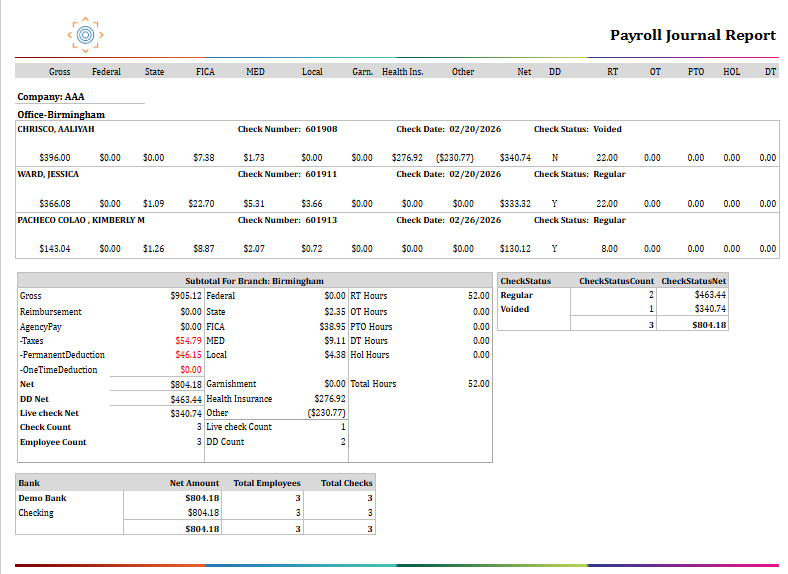
Report Details
Category | Value |
Parent Category | Back Office |
Category | Payroll |
Report Type | Paginated Report |
Report runs from Application | RMS |
Report Category: | Shareable |
Report Level | Payment |
Report Parameters
Report Parameter | Description | Parameter Options | Default | Required |
Date Type | Filters records by the type of date selected. | Accounting Period Date / Check Date | Accounting Period Date | Yes |
Start Date | Filters records on or after this date, based on the Date Type selected. | Yes | ||
End Date | Filters records on or before this date, based on the Date Type selected. | Yes | ||
Company | Filters results to selected company | List of companies present that a user has access | All | No |
Office | Filters the results based on the office of the company selected | List of offices belonging to a company that a user has access | All | No |
Payment Type | Filters records by the payment method used for the check. | Both / Direct Deposit / Live Check | Both | Yes |
Bank | Filters records by the bank account used to fund the payment batch. | List of expense-type bank accounts | All | No |
SSN | Filters records to a specific employee by Social Security Number. | Any valid SSN or % for all | % | No |
Show Summary | When set to True, the report displays only summary totals without individual check-level rows. | True / False | False | Yes |
Include Archived Data | Includes archived historical records in addition to live records. | Dropdown (Yes, No) | No | No |
Report Grouping
Company
Office
The report is by default grouped according to company and office.
Report Columns
Report Column | Description | Definition/Logic |
Gross | Total gross earnings for the check | The total amount of wages earned before any taxes or deductions are taken out. |
Federal | Federal income tax withheld | The total federal income tax (FIT) taken out of the employee's paycheck. This comes from Payment Tax entries where the tax type is FIT, and the tax applies to the employee (not the employer). |
State | State income tax withheld | The total state income tax (SIT) taken out of the employee's paycheck. This comes from Payment Tax entries where the tax type is SIT and the tax applies to the employee. |
FICA | Social Security tax withheld (employee share) | The employee's share of Social Security tax. This comes from Payment Tax entries where the tax type is FICA and the tax applies to the employee |
MED | Medicare tax withheld (employee share) | The employee's share of Medicare tax. This comes from Payment Tax entries where the tax type is MEDI and the tax applies to the employee. |
Local | Local/city/county tax withheld | Any local, city, or county tax withheld from the employee's paycheck. This includes all employee-side taxes that are not Federal (FIT), State (SIT), Social Security (FICA), Medicare (MEDI), FUTA, or SUTA. |
Garn. | Wage garnishment deduction | The amount withheld from the employee's pay due to a court-ordered garnishment (e.g., child support, tax levy). |
Health Ins. | Health insurance deduction | The amount deducted from the employee's pay for health insurance. This includes both pre-tax and post-tax insurance deductions. |
Other | All other deductions and adjustments | Catch-all for any remaining deductions or adjustments on the paycheck that are not garnishments or health insurance. This includes one-time deductions and any transaction-level deductions (such as advances or other employee-specific adjustments). |
Net | Employee take-home pay | The final amount the employee actually receives after all taxes and deductions have been taken out of the gross pay. Net = Gross - Total Taxes (Federal + State + FICA + MED + Local) - Permanent Deductions - One-Time Deductions. |
DD | Direct deposit indicator | Shows whether the check was paid via direct deposit. Y = paid by direct deposit. N = paid by live (paper) check. |
RT | Regular time hours | Total regular time hours worked and paid on this check. RT = Sum of RT Pay Hours across all transactions linked to the payment. |
OT | Overtime hours | Total overtime hours worked and paid on this check. OT = Sum of OT Pay Hours across all transactions linked to the payment. |
PTO | Paid time off hours | Total paid time off hours applied to this check. PTO = Sum of PTO Pay Hours across all transactions linked to the payment. |
HOL | Holiday hours | Total holiday hours paid on this check. HOL = Sum of Hol Pay Hours across all transactions linked to the payment. |
DT | Double time hours | Total double-time hours worked and paid on this check. DT = Sum of DT Pay Hours across all transactions linked to the payment. |
Agency Pay | Total agency (contractor) pay | Reserved for contractor/agency pay amounts. Shown as $0 for standard employee payroll. |
-Taxes | Total employee taxes withheld | Total of all employee-side tax withholdings: Federal + State + FICA + MED + Local. Taxes = Federal + State + FICA + MED + Local. |
-Permanent Deduction | Total recurring deductions | Sum of recurring (permanent) deductions set on employees' payment records, such as ongoing health insurance or benefit deductions. |
-One Time Deduction | Total one-time deductions | Sum of one-off deductions applied in this payroll run |
DD Net | Total net pay via direct deposit | Sum of Net for all checks in the group where the payment was made via direct deposit (Is Live Check = No). |
Live Check Net | Total net pay via paper check | Sum of Net for all checks in the group where the payment was made via live/paper check (Is Live Check = Yes). |
Check Count | Total number of checks issued | Count of distinct payment records in the group, including voided checks. |
Employee Count | Total number of unique employees paid | Count of distinct employees who received a payment in the group. |
DD Count | Number of direct deposit payments | Count of checks in the group paid via direct deposit. |
Live Check Count | Number of paper checks issued | Count of checks in the group paid via live (paper) check. |
Check Status Summary | Check Status, Count, Net | Groups checks by their status (e.g., Regular, Voided) and shows the count and total Net for each status. Useful for quickly identifying how many checks were voided in the run. |
Bank Summary | Bank, Net Amount, Total Employees, Total Checks | Groups checks by the bank account used for payment and shows the total Net, distinct employee count, and check count per bank. Supports bank register reconciliation. |