Summary
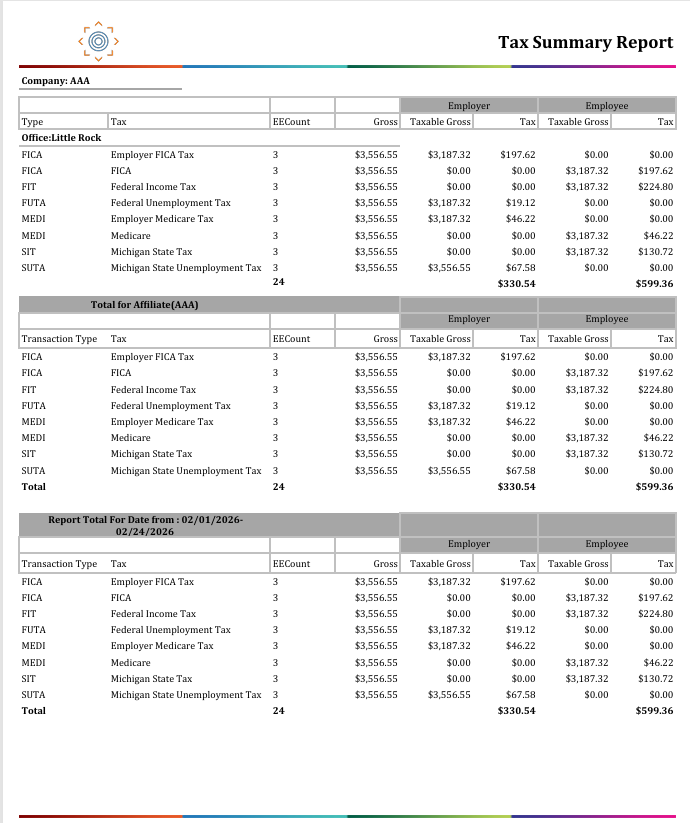
The Tax Summary Report provides a comprehensive, grouped view of all payroll-related taxes processed within a selected date range. It captures both the employer's share and the employee's share of every tax type, including FICA, Medicare, Federal Income Tax, FUTA, SUTA, and state-level taxes along with the total gross wages and taxable gross amounts on which those taxes are based.
Its key feature is the ability to filter by Company, Office, Tax Type, and the 'Relates To' dimension (Employer, Employee, or Both), allowing finance and payroll teams to quickly zero in on exactly the tax obligation they need to review, reconcile, or report.
When grouped by office, the report presents subtotals at the Office level, Company level, and an overall Report Total making it easy to compare tax liabilities across locations or roll them up for filing purposes.
This report is essential for:
Payroll & Finance Teams: Verifying that correct tax amounts were withheld and remitted for each payroll cycle.
Compliance & Tax Filing: Providing the detail needed to reconcile payroll tax deposits with 941/940 returns and state filings.
Branch Managers & Controllers: Understanding the true employment cost beyond gross wages by seeing employer-side tax burdens per office.
By using this report, staffing companies gain a clear picture of total tax liability per period, enabling accurate accruals, timely deposits, and audit-ready records, all in one place.
Report Overview
Attribute | Details |
Purpose | Provides a summarized view of all payroll taxes (employer and employee) processed within the selected date range, grouped by office, company, and overall report total. Enables reconciliation of tax withholdings and employer tax contributions. |
Classification | Business-Critical Report |
Who Should Use This Report | Finance and Accounting, Payroll Teams, Compliance/Tax Officers, Branch Managers |
Business Problem Solved | Gives details on the tax collected and remitted for each employee and each employer over the period. Makes it easy to spot discrepancies and support tax filings |
Run Frequency | Per payroll cycle, monthly for tax deposits, annually for year-end review |
Related Reports | Tax Summary (Spreadsheet and Paginated), Payment Tax |
Business Value
Category | Description |
Tax Reconciliation | Matches total taxes withheld from employees and paid by the employer to the expected amounts per payroll period, reducing the risk of under- or over-remittance. |
Compliance Support | Provides line-by-line tax type detail (FICA, FUTA, SUTA, SIT, FIT, Medicare) required for state returns and payroll audits. |
Employment Cost Visibility | Shows the full employer cost of each payroll run gross wages plus all employer-side taxes supporting budget forecasting and client decisions. |
Multi-Office Oversight | Subtotals at the office and company level allow controllers and branch managers to compare tax calculations across locations. |
Known Issues or Limitations
Issues | Description |
EE Count is not summed in totals | Employee count (EE Count) is shown per tax line but is intentionally excluded from the Office, Company, and Report totals to avoid double-counting employees who appear on multiple tax lines. |
Posted payments only | The report only includes transactions from posted (closed) payment batches. Payments in open or unposted batches will not appear. |
Troubleshooting Guide
Issues | Problem Reason | Solution |
No data displayed | Payment batch is not posted. | Verify that the payroll batch has been fully processed and closed before running the report. |
Tax amounts seem lower than expected | Date range or Date Type does not cover the full pay period | Adjust the Start/End Date and confirm the Date Type (Check Date vs. Accounting Period Date) matches how the batch was processed. |
Taxable Gross differs from Gross | Pre-tax deductions reduce the taxable base | This is expected behavior as Taxable Gross = Gross Wage – Pre-Tax Items. |
FAQ
Questions | Answers |
Why does the Taxable Gross differ between FICA and SUTA? | FICA taxes wages up to the annual Social Security wage base. SUTA taxes up to a state-specific annual wage cap. Employees who have hit those caps show lower (or zero) taxable gross for those taxes, even though their gross wages keep accumulating. |
What is the difference between Employer Tax and Employee Tax in this report? | Employer Tax is the company's own share of a tax (e.g., employer FICA, FUTA, SUTA). Employee Tax is the amount withheld from the worker's paycheck (e.g., employee FICA, Medicare, FIT, SIT). Both are displayed side-by-side for each tax type. |
Can I run this report for a single tax type? | Yes. Use the Tax Type parameter to filter a specific tax (e.g., FICA only). Leave it blank to see all tax types. |
What does 'Relates To: Both' mean? | 'Both' means the report shows employer-side taxes and employee-side taxes in the same view. You can restrict to 'Employer' or 'Employee' only using the Relates To parameter. |
Reference Video/Screenshot
Report Details
Category | Value |
Parent Category | Back Office |
Category | Payroll |
Report Type | Paginated |
Report runs from Application | RMS |
Report Category: | Shareable |
Report Level | Payment |
Report Parameters
Report Parameter | Description | Parameter Options | Default | Required |
Date Type | Drop down containing Check date and Accounting Period to filter the report | Check Date / Accounting Period Date | Check Date | Yes |
Start Date | The beginning of the date range to include in the report. | Any valid date | Yes | |
End Date | The end of the date range to include in the report. | Any valid date | Yes | |
Company | Filters results to selected company | List of companies present that a user has access | All | No |
Office | Filters the results based on the office of the company selected | List of offices belonging to a company that a user has access | All | No |
Group By Office | When set to Yes, results are organized by office with subtotals per office, then per company, then a report total. | Yes / No | Yes | Yes |
Relates To | Controls whether the report shows employer-side taxes, employee-side taxes, or both in the same view. | Employer / Employee / Both | Both | Yes |
Tax Type | Narrows the report to a specific tax type (e.g., FICA only). Leave blank to include all tax types. | List of tax types configured in the system | All | No |
Report Grouping
Company
Office
The report will always be grouped as per Company but will only be grouped as per office when Group By Office parameter is set to ‘Yes’.
Report Columns
Report Column | Description | Definition/Logic |
Type | Tax transaction type code | A short label identifying the tax category (e.g., FICA, FIT, FUTA, MEDI, SIT, SUTA). |
Tax | Full tax description | Readable name paired with the code — e.g., Employer FICA Tax, Federal Income Tax, Michigan SUTA |
EE Count | Number of employees | The number of unique employees who had this tax applied during the period. |
Gross | Total gross wages for the period | Total pay before taxes or deductions. Gross = Sum of all earnings- related pay items within the date range |
Employer – Taxable Gross | The portion of gross wages subject to employer-side tax | Not all wages are taxable for every tax. This column shows how much of the gross wage is actually subject to this specific employer tax. |
Employer – Tax | The amount of employer tax owed | The actual tax amount the company owes for this tax type. This is what the employer pays out of their own pocket on top of the employee's wages. Employer Tax = sum of the Tax field from all employer-flagged tax records (Is Employer Tax = true) that fall within the date range. |
Employee – Taxable Gross | The portion of gross wages subject to employee-side tax | The amount of the employee's earnings that is taxable for this specific employee-paid tax. Just like on the employer side, pre-tax deductions or wage caps may reduce this below the full gross. |
Employee – Tax | The amount withheld from the employee | The actual tax amount deducted from the employee's paycheck. This is money the employee owes; it's collected by the employer and remitted on the employee's behalf. |
Additional Notes
FICA - Social Security Tax – Paid By: Employer + Employee |
MEDI - Medicare Tax – Paid By: Employer + Employee |
FIT - Federal Income Tax – Paid By: Employee only |
FUTA - Federal Unemployment Tax – Paid By: Employer only |
SIT - State Income Tax – Paid By: Employee only |
SUTA - State Unemployment Tax – Paid By: Employer only |