Summary
The Employee Wage Statement Report provides a check-level summary of wages paid to each employee, including gross wages, taxes, deductions, and net pay. It is designed to give employees and back-office staff a clear, concise view of earnings for a given period.
Its standout feature is the ability to filter by SSN or Employee, making it easy to look up individual wage history without running broad queries. The report also supports Date Type flexibility; users can filter by Accounting Period Date or Check Date to align with how their office tracks payroll.
By presenting check-level details alongside employer information and hours worked, the report enables faster payroll verification, employee self-service support, and accurate wage record-keeping.
This report is essential for:
Payroll Teams: verifying gross wages, taxes withheld, and net pay for every paycheck issued.
HR & Compliance: responding to employee wage inquiries or audit requests using SSN or employee name lookups.
Branch Managers: reviewing payroll totals by office and confirming hours worked per check.
By using this report, staffing companies gain full transparency into employee compensation records, enabling accurate payroll audits, faster employee support, and regulatory compliance.
Report Overview
Attribute | Details |
Purpose | Provides a check-level wage summary per employee, showing gross wages, total taxes, non-taxable adjustments, net pay, hours worked, and pay rate. Supports lookup by SSN or employee name across selected companies and offices. |
Classification | Business-Critical Report |
Who Should Use This Report | Payroll Teams, HR & Compliance, Branch Managers, Finance and Accounting |
Business Problem Solved | Gives a clear, check-by-check record of what each employee was paid, helping teams verify payroll accuracy, respond to employee wage questions, and meet audit or compliance requirements. |
Run Frequency | Per payroll cycle, on demand for employee inquiries, or as needed for audits and compliance reviews. |
Related Reports | Employee Wage Detail, Payment List |
Business Value
Category | Description |
Payroll Accuracy | Verify that each employee's check reflects the correct gross wages, taxes, deductions, and net pay before or after payroll close. |
Employee Self-Service Support | Quickly pull wage history for an individual using their SSN or name or visible through employee profile, reducing time spent responding to employee pay inquiries. |
Audit & Compliance | Provides a verifiable wage record per check, supporting internal audits, government reporting, and compliance reviews. |
Operational Visibility | Allows branch managers to review hours worked and pay rates per employee, supporting workforce planning and cost control. |
Known Issues or Limitations
Issues | Description |
No data returned when Date and Employee/SSN are not provided | The report requires at least a date range or an SSN / Employee filter to return results. If all filters are left blank, the report returns no data to prevent unintentional large data pulls. |
Pay Rate reflects most recent Regular Time (RT) rate only | The Pay Rate column shows the most recent Regular Time pay rate from the latest check in the filtered period. It does not reflect overtime or other pay code rates used in previous checks. |
Reissued checks included in totals | The report includes both Regular and Reissued check statuses. Users should be aware that reissued checks may cause the same pay period to appear more than once for an employee. |
Troubleshooting Guide
Issues | Problem Reason | Solution |
No data displayed | Date range, SSN, and Employee are all left blank | Provide at least a Start Date and End Date or enter an SSN or Employee name to run the report. |
Gross Wages shows 0 | Payment batch has not been fully posted/closed | Verify the payment batch is posted. Unposted batches are excluded from the report. |
Pay Rate shows 0 | No Regular Time (RT) pay code exists on any check for the employee in the selected period | Confirm the employee has at least one RT-coded transaction in the date range. Pay Rate only populates from RT pay codes. |
Unexpected duplicate rows per employee | Employees have both Regular and Reissued checks in the same period | Filter results by Check Number or Check Date to identify and separate reissued checks from originals. |
Missing checks for an office | Office filter excludes the relevant office or user lacks access | Expand the Office filter or verify data access permissions for the user running the report. |
FAQ
Questions | Answers |
Can I look up a specific employee's wage history using their SSN? | Yes. Enter the employee's SSN in the SSN parameter (with or without dashes) and leave the date range blank to retrieve all available check history. You can also combine SSN with a date range to narrow results. |
Can I look up a specific employee's wage history from EIS? | Yes, the report can be viewed per employee by navigating to specific employee’s profile, favorite icon and generate by clicking and previewing the employee wage statement. |
Why is Gross Wages different from what I see in payroll? | Gross Wages are displayed directly from the Payment record. If the batch was reopened or adjusted after posting, run the report again after the batch is re-closed to get updated figures. |
What is Non-Tax Adjustment? | Non-Tax Adjustment is the total of all non-taxable deductions or adjustments applied to the check, such as garnishments or non-taxable reimbursements that reduce or adjust take-home pay without affecting taxable wages. |
Reference Video/Screenshot
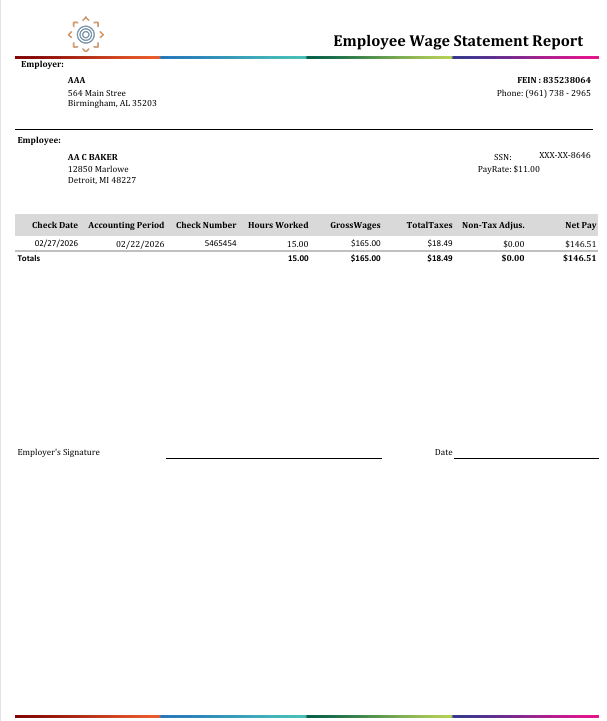
Report Details
Category | Value |
Parent Category | Back Office |
Category | Payroll |
Report Type | Paginated Report |
Report runs from Application | RMS and EIS |
Report Category: | Application and Shareable |
Report Level | Employee, Payment |
Report Parameters
Report Parameter | Description | Parameter Options | Default | Required |
Date Type | Determines which date field is used to filter the checks returned by the report. | Accounting Period Date / Check Date | Accounting Period Date | No |
Start Date | The beginning of the date range applied to the selected Date Type. | No | ||
End Date | The end of the date range applied to the selected Date Type. | No | ||
Company | Filters results to selected company | List of companies present that a user has access | All | No |
Office | Filters the results based on the office of the company selected | List of offices belonging to a company that a user has access | All | No |
SSN | Filters results to checks for the employee matching this Social Security Number. (Dashes are optional). | Free text | No | |
Employee | Filters results to a specific employee by their name or Employee ID (numeric). | Free text (name) or numeric Employee ID | % | No |
Report Grouping
The report doesn’t contain any formal groupings, but the information is presented in a hierarchy: employer details first, followed by employee details, and then the employee’s check information.
Report Columns
Report Column | Description | Definition/Logic |
Employee Name | Full name of the employee | The employee's full name stored in the system. |
SSN | Employee's Social Security Number | Displayed in masked or full format depending on user permissions to ViewFullSSN option Property. |
Employee Address | Employee's home address | Street address, city, state, and zip code from the employee's most current address record. |
Employee Phone | Employee's contact phone number | Formatted as (XXX) XXX - XXXX from the employee's primary phone contact record. |
Employee Email | Employee's email address | Pulled from the employee's primary email contact record. |
Employer | Name of the staffing company (employer) | The company that issued the check. This is the staffing agency's legal entity name. |
FEIN | Federal Employer Identification Number | The employer's federal tax ID number linked to the company. |
Employer Address | Employer's office address | Street, city, state, and zip of the employer's registered address. |
Employer Phone | Employer's contact phone number | The employer's primary phone number, formatted as (XXX) XXX - XXXX. |
Employer Fax | Employer's fax number | The employer's fax number from the company contact records. |
Office | Name of the office that processed the paycheck | The branch or office within the company that is linked to the payment. |
Check Date | Date the paycheck was issued | The date the payment batch was released as checks. This is the date the employee received their pay. |
Pay Period End (PPE) | The last day of the pay period covered by the check | The most recent Pay Period End Date from the transactions linked to this check. Tells which work period this paycheck covers. |
Accounting Period | The accounting period the check belongs to | The accounting date the payment batch was assigned to. Used to match payroll activity to the correct financial period. |
Check Number | Unique check identifier | The check or payment reference number assigned to this specific paycheck. |
Hours Worked | Total hours associated with this paycheck | The total pay hours across all transactions linked to the check. All the hours the employee worked over a period that are tied to this payment. |
Pay Rate | Employee's Regular Time hourly rate | The Regular Time (RT) pay rate from the most recent check in the filtered period. This is the employee's base hourly wage. |
Gross Wages | Total gross pay before taxes and deductions | The total gross amount on the pay check — this is the full amount earned before any taxes or deductions are taken out. (sum of all earnings on the check). |
Total Taxes | Total taxes withheld from the check | The total amount of all taxes deducted from the check, including federal, state, and local taxes. Formula: Sum of taxes for the check. |
Non-Tax Adjustment | Total non-taxable deductions or adjustments | The sum of all deductions or adjustments that are not subject to taxes — for example, garnishments or non-taxable reimbursements. Formula: Sum of all Payment Adjustment amounts for deductions that are NOT State Tax Equivalents (non-STE deductions). |
Net Pay | The amount the employee actually takes home | What the employee receives after taxes and deductions are taken out. |