Summary
The Payment Deduction Report provides a clear, payment-level view of all payroll deductions applied to employee payments, helping payroll teams quickly identify, verify, and reconcile deduction amounts across employees and offices.
Its standout feature is the flexible Group By capability, allowing the report to be instantly organized by Office, or deduction code. This makes it easy to analyze deduction patterns from multiple perspectives without running separate reports.
By combining detailed deduction data with dynamic grouping, the report enables faster reconciliation, clearer deduction visibility, and more confident payroll decisions — all in one place.
This report is essential for:
Finance & Accounting: validating deduction totals before financial close.
Payroll & Billing Teams: reconciling deduction codes, amounts, and check-level details.
HR & Compliance Teams: verifying garnishments, benefit deductions, and deduction code accuracy.
By using this report, staffing companies gain transparency into payroll deductions, enabling smarter decisions about deduction configuration, compliance, and employee payment accuracy.
Report Overview
Attribute | Details |
Purpose | Provides a detailed breakdown of deduction amounts per employee. Users can group results by Office, Deduction code to view both summary-level and payment-level deduction data. |
Classification | Business-Critical Report |
Who Should Use This Report | Finance and Accounting, Payroll and Billing Teams, HR/Compliance Teams |
Business Problem Solved | Helps identify and reconcile payroll deductions at the transaction level, ensuring accuracy before payroll is finalized and supporting audit and compliance requirements |
Run Frequency | Weekly, Biweekly, Monthly as needed for audits or financial review |
Related Reports | Payroll Register, Payroll Summary |
Business Value
Category | Description |
Deduction Accuracy | Validate deduction amounts at the payment level for each employee across offices. |
Compliance & Audit Support | Provides detailed records for payroll deduction reconciliation, supporting internal and external audits. |
Operational Control | Supports deduction code management, rate verification, and exception handling. |
Employee Transparency | Helps payroll teams answer employee questions about specific deduction amounts and dates. |
Known Issues or Limitations
Issues | Description |
Negative amounts for Employees | This typically reflects corrective/reversal payments processed in the selected date range. Verify underlying payment batches. |
Troubleshooting Guide
Issues | Problem Reason | Solution |
No data displayed | Payment batch not posted | Verify that the payment batch has been fully processed and posted |
Deduction amounts missing | Deduction code not linked to a valid Deduction record | Ensure the pay code is configured as a Deduction type in Transaction Code setup. |
FAQ
Questions | Answers |
Can I run this report for a single employee? | Yes — use the Name / Person Id parameter to filter the report to a specific employee. The employee’s name will appear in the report header Name. |
Reference Video/Screenshot
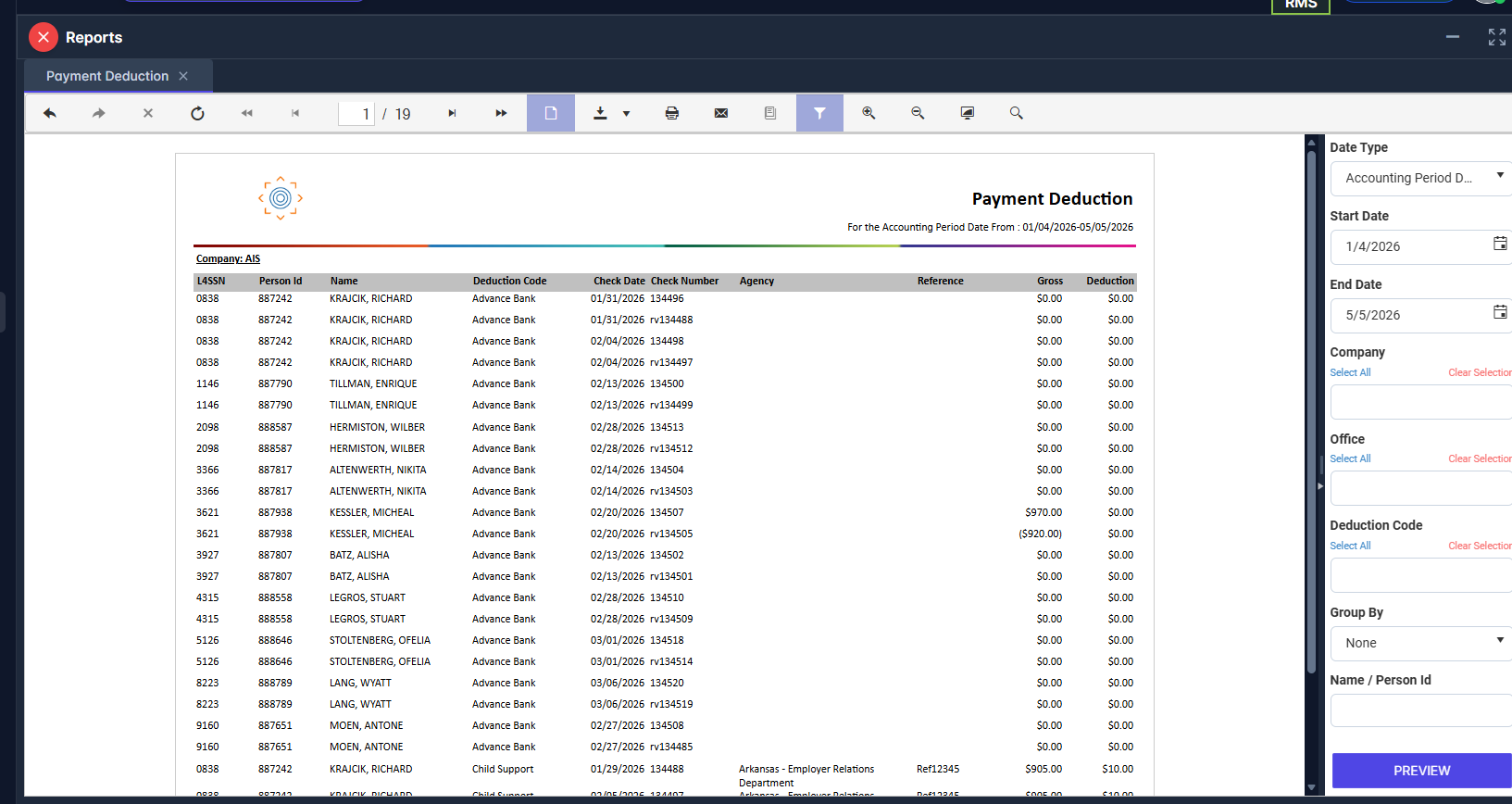
Report Details
Category | Value |
Parent Category | BackOffice |
Category | Payroll |
Report Type | Paginated Report |
Report runs from Application | RMS |
Report Category: | Shareable |
Report Level | Payroll |
Report Parameters
Report Parameter | Description | Parameter Options | Default | Required |
Date Type | Filters records by the type of date selected | Check Date / Accounting Period Date | Accounting Period | Yes |
Start Date | Start of the date range, based on Date Type selected | Yes | ||
End Date | End of the date range, based on Date Type selected | Yes | ||
Company | Filters results to selected company | List of companies present that a user has access | All | No |
Office | Filters records by offices for the selected company | List of offices under selected company | All | No |
Deduction Code | Filters records by the selected deduction code | List of configured deduction codes | All | No |
Name / Person Id | Filters report to a specific employee by Person Id or by Name. | Free Text to enter Employee Id or name | All | No |
Group By | Groups records by the option selected | Office / Deduction Code/ None | None | Yes |
Report Grouping
Office
Deduction Code
The report is grouped either by Office or by Deduction Code.
Report Columns
Report Column | Description | Definition/Logic |
L4SSN | Last 4 digits of Social Security Number | Only the last 4 digits of the SSN are displayed for security compliance: RIGHT (SSN, 4). |
Person Id | Employee Id of on respective payment | Unique identifier for an employee record present in the system |
Name | Employee Full Name | The full name (Name2) of the employee associated with the payment. |
Deduction Code | Deduction transaction code | The Description field from the Transaction Code of type Deduction record. |
Check Date | Date of the paycheck | The Check Date from the Payment Batch associated with the payment. |
Check Number | Payment check number | The Check Number assigned to the payment record. |
Agency | Agency name | The Organization name applies to agency. |
Reference | Deduction reference code or note | The Reference field from the Person Adjustment record, often used to link to garnishment or benefit plan identifiers. |
Gross | Employee gross pay on the check | The Gross field from the Payment record total gross wages before deductions. |
Deduction | Deduction Amount | Adjustment from Deduction code on that check. |
Additional Notes
SSN Display: For security and compliance, only the last 4 digits of an employee's Social Security Number are shown. Full SSN is never exposed in this report. |
Posted Batches Only: The report only returns data for payment batches where Post Date IS NOT NULL. Unposted or open batches are excluded from all results. |