Summary
The CA Pay Data Employee Report helps staffing agencies operating in California comply with annual pay data reporting requirements under California Government Code §12999. The report compiles payroll, demographic, and hours-worked information for W-2 employees and organizes the data by establishment location, race/ethnicity, sex, job category, pay band, exemption status, and employment type. It then generates the output in the exact format required for submission to the California Civil Rights Department (CRD).
This report is essential for:
HR & Compliance Teams: generating the state-required file for the annual CRD submission (due by the second Wednesday in May each year).
Payroll Managers: confirming that pay, hours, and demographic information are accurate before filing.
Branch/Office Managers: reviewing their office's pay equity breakdown by demographic group.
Finance Teams: confirming that total annual earnings fall into the correct pay ranges before submission.
By using this report, staffing agencies avoid civil penalties for non-filing and gain a clear view of pay equity across every office they operate in California.
Report Overview
Attribute | Details |
Purpose | Produces the employee pay data file required for annual submission to the California Civil Rights Department (CRD) under CA Gov. Code 12999. |
Classification | Compliance Report |
Who Should Use This Report | HR & Compliance Teams, Payroll Managers, Branch Managers |
Business Problem Solved | Enables employers with 100+ employees in CA to file their annual pay data report, avoiding civil penalties for non-filing. |
Run Frequency | Annually — run once per reporting year, typically before the May filing deadline |
Related Reports | CA Pay Data – Contractor Report |
Business Value
Category | Description |
Regulatory Compliance | Produces the file in the exact format required by the CRD, so no manual reformatting is needed before submission. |
Pay Equity Visibility | Breaks down average and median hourly rates by race/ethnicity, sex, and job category, revealing pay differences across demographic groups at each office location. |
Remote Worker Accuracy | Separately counts on-site employees, remote employees living in California, and remote employees living outside California — satisfying the remote-work reporting requirement introduced in 2023. |
Hours Accuracy | Adds up total annual hours and weeks worked across the full reporting year — not just a single pay period — ensuring accurate hours data. |
Exemption Transparency | Identifies salaried (exempt) vs. hourly (non-exempt) employees within each group so the report accurately reflects how workers are classified. |
Known Issues or Limitations
Issues | Description |
NAICS Code may be blank | The industry code is pulled from the office/company profile in Zenople. If it has not been entered there, this field will be blank in the output and must be filled in manually before CRD submission. |
Only finalized payroll runs are included | The system currently does not track User Type at the Assignment Schedule level. As a result, the report displays data based on the User assigned at the assignment level, which may differ from user-type expectations. |
Demographic information defaults to "Other" | If a worker's race/ethniscity or gender has not been entered in their profile, the system defaults to "Other," which appears as the unknown code in the output. This can cause the report to overstate the "Unknown/Other" group. |
Pay rate may be estimated for some workers | If a worker's pay record does not include a standard hourly or salary rate, the system uses the highest pay rate found on that pay record. This may not always reflect the worker's true hourly rate. |
Median rate calculation | The median hourly rate is calculated within each office location grouped by race/ethnicity and sex. Workers with no pay rate recorded are excluded from this calculation. |
Seasonal workers are reported as Intermittent | Workers classified as "Seasonal" are reported as "Intermittent" in the output file. This matches the values accepted by the CRD. |
Troubleshooting Guide
Issues | Problem Reason | Solution |
No data displayed | The Company or Office selected does not match any finalized payroll for the date range entered, or the State filter does not match the office's state. | Confirm the date range covers the full reporting year. Check that the State filter is set to CA (or left blank for all states). Verify that at least one payroll run for the period has been finalized. |
Fewer employees than expected | Some payroll runs have not been finalized, or some workers are not classified as employees (they may be set to Contractor). | Confirm all payroll runs for the period are finalized. Check that the affected workers are classified as employees, not contractors, in their worker profiles. |
Race/Ethnicity/Sex shows the unknown code for many rows | The worker's race/ethnicity and/or gender has not been entered in their profile. | Enter race/ethnicity and gender for the affected workers in their profiles in Zenople before re-running the report |
Hours worked appears incorrect | The Reporting Year entered does not match the calendar year of the date range selected. The annual hours calculation uses the Reporting Year to look up the full year's hours. | Make sure the Year field matches the calendar year of the date range (e.g., enter 2025 if the date range is Jan–Dec 2025). |
Establishment address is wrong | The address shown comes from the office's current address on file in Zenople. If the office moved during the year, some records may reflect the old address. | Verify that the office address in Zenople is up to date before running the report. |
Employment Type column is blank | The worker's employment type (Full-Time, Part-Time, etc.) has not been set in their profile. | Enter the employment type on the worker's profile in Zenople. |
Headquarters field shows incorrect value | This is determined by comparing the office address to the job site address. If no job site address has been linked to the job order, the comparison cannot be made. | Make sure a job site address is linked to the relevant job orders. |
FAQ
Questions | Answers |
Who is required to file this report? | Private employers with 100 or more employees who are required to file a federal EEO-1 report must file if they have at least one California location. Staffing agencies with 100 or more workers placed at client sites also file a separate Contractor Report. |
What is the filing deadline? | The second Wednesday in May each year (e.g., May 14, 2025 for Reporting Year 2024). |
What does the Pay Band represent | The Pay Band groups workers based on how much they earned in total during the reporting year. There are 12 bands, from the lowest (Band 1: up to $19,239) to the highest (Band 12: $239,200 and above). |
How is the Race/Ethnicity/Sex code structured? | It is a 3-character code used by the CRD. The letter indicates the race/ethnicity group (A = Hispanic/Latino; B = Non-Hispanic Male; C = Non-Hispanic Female; D = Non-Hispanic Non-Binary; U = Unknown). The number indicates sex: 10 = Male, 20 = Female, 30 = Non-Binary. "UU" means both are unknown. |
How is Mean Hourly Rate calculated? | The total of all workers' hourly rates in the group divided by the number of workers. For salaried workers, the hourly rate is the weekly salary divided by 40 hours. |
How is Median Hourly Rate calculated? | The middle value when all hourly rates in the group are sorted from lowest to highest — half the workers earn more, half earn less |
What is the difference between the Employee and Contractor reports? | The Employee Report covers your agency's own W-2 employees and groups data by office/branch location. The Contractor Report covers workers placed at client sites (both employees and contractors) and groups data by the client company, adding the agency name, tax ID, and snapshot period dates. |
What does "Remote CA Employees Located Outside CA" mean? | Workers whose job is based in California but who live and work remotely from outside California. |
Reference Video/Screenshot
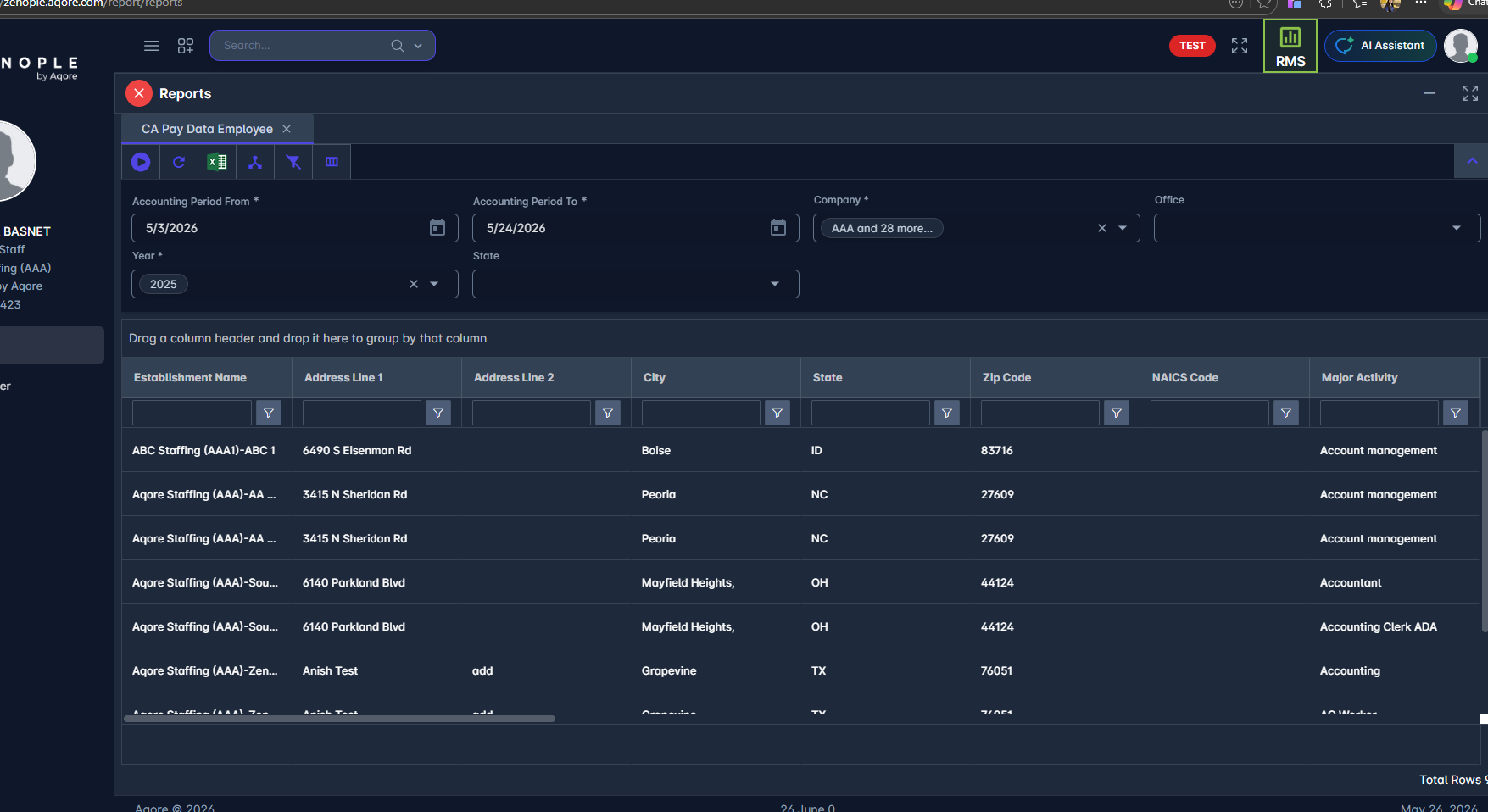 Report Details
Category | Value |
Parent Category | BackOffice |
Category | Compliance |
Report Type | Spreadsheet Report |
Report runs from Application | RMS |
Report Category | Shareable |
Report Level | Payment |
Report Parameters
Report Parameter | Description | Parameter Options | Default | Required |
Accounting Period From | The start date of the payroll period to include. Set this to the first day of the reporting year (e.g., 01/01/2025). | Accounting Period Date/ Pay Period End Date/ Check Date | Yes | |
Accounting Period To | The end date of the payroll period to include. Set this to the last day of the reporting year (e.g., 12/31/2025). | Yes | ||
Year | The reporting year. Used to calculate total annual hours and weeks worked for the full calendar year. Must match the year entered in the date range above. | Yes | ||
Company | Filters records by companies selected | List of companies that the users have access to | No | |
Office | Filters records by offices selected | List of offices for the company selected | No | |
State | Filters results to a specific state. Enter CA to show only California locations, or leave blank to include all states. | State abbreviation | Yes |
Report Grouping
The report produces one row per unique combination of:
Office Location (the establishment)
Job Category (EEO-1 category 1–10)
Race/Ethnicity/Sex (3-character CRD code)
Pay Band (1–12, based on total annual earnings)
Exemption Status (Salaried / Hourly)
Each row represents a group of employees who share all five of those attributes at the same office location.
.
Report Columns
Report Column | Description | Definitions/Logic |
Establishment Name | The name of the staffing agency's office/branch location. | Sum of PayUnit for all Pay Codes with Earnings Category. |
Address Line 1 | First line of the office's physical address. | The address currently on file for the office in Zenople. |
Address Line 2 | Second line of the office address (suite, floor, etc.). | The secondary address line on file for the office. May be blank. |
City | City of the office address. | The city on file for the office address. |
State | Two-letter state abbreviation of the office location. | The state on file for the office. Locations outside the US show as OT. |
Zip Code | ZIP code of the office address. | The ZIP code on file for the office address. |
NAICS Code | The industry classification code for this office location. | Pulled from the company's profile in Zenople. May be blank if not yet entered — must be verified before CRD submission. |
Major Activity | The primary type of work associated with this employee group. | The job skill/category assigned to the workers in this group. |
Total Number of CA Payroll Employees at Est | Total number of distinct employees at this office location across all groups. | Count of unique employees at this office location. |
Was Prior Year CA Report Filed? | Whether a CA Pay Data report was filed for this location in the previous year. | Defaults to Yes. Should be reviewed and corrected for new office locations. |
Is this Est the Employer's Headquarters? | Whether this office location is the employer's main headquarters. | Yes if the office address matches the job site address; otherwise No. |
Job Category | The EEO-1 job category number (1–10) for this group. | Based on the job role category assigned to the worker: 1 = Exec/Senior Management, 2 = Mid-Level Management, 3 = Professionals, 4 = Technicians, 5 = Sales Workers, 6 = Administrative Support, 7 = Craft Workers, 8 = Operatives, 9 = Laborers & Helpers, 10 = Service Workers. |
Race/Ethnicity/Sex | The 3-character CRD code identifying the demographic group. | Letter = Race/Ethnicity (A = Hispanic/Latino; B = Non-Hisp Male; C = Non-Hisp Female; D = Non-Hisp Non-Binary; U = Unknown). Number = Sex: 10 = Male, 20 = Female, 30 = Non-Binary. UU = both unknown. |
Pay Band | The earnings band (1–12) this group falls into. | Based on each worker's total annual earnings. See Additional Notes for the full pay band scale. |
Exemption Status | Whether workers in this group are salaried (Exempt) or hourly (Non-Exempt). | Exempt = workers paid a weekly salary. Non-Exempt = workers paid an hourly rate. |
Employment Type | The employment classification of the workers in this group (e.g., Full-Time, Part-Time). | Based on the employment type recorded in each worker's profile. Seasonal workers are reported as Intermittent to match CRD-accepted values. |
Total CA Employees in This Employee Group | Total number of workers in this specific group. | Sum of on-site employees, remote employees in CA, and remote employees outside CA for this group. |
Total Annual Hours Worked | Total hours worked by all employees in this group across the full reporting year. | Sum of all recorded hours from finalized payroll runs for the reporting year, for employees only. |
Total Annual Weeks Worked | Total number of distinct pay periods worked by this group during the reporting year. | Count of unique pay periods with finalized payroll for this group during the reporting year. |
Mean Hourly Rate | The average hourly pay rate for workers in this group. | Total of all hourly rates divided by the number of workers. For salaried workers, the hourly equivalent is weekly salary ÷ 40 hours. |
Median Hourly Rate | The middle hourly pay rate when all workers in the group are ranked from lowest to highest rate. | The midpoint value of all hourly rates within this office location, race/ethnicity, and sex grouping. |
Number of CA Employees That Do Not Work Remotely | Count of employees in this group who work at a physical job site (not from home). | Workers whose work location is set to a physical job site, not their home address. |
Number of Remote CA Employees Located Within CA | Count of remote workers in this group who live in California. | Workers whose work location is their home address and who live in California. |
Number of Remote CA Employees Located Outside CA | Count of remote workers in this group whose job is based in CA but who live outside California. | Workers whose work location is their home address, where the job is based in CA but the worker's home is in another state. |
Row Level Clarifying Remarks | Optional notes for this row. | Always blank in the export. Can be filled in manually before CRD submission if clarification is needed. |
Additional Notes
The date range and Year fields must match. Set both to cover the full calendar year (Jan 1 – Dec 31) so that annual hours and weeks are calculated correctly. |
Pay bands are based on each worker's total earnings for the year across all pay runs — not based on an annualized rate from a single paycheck. |
Only finalized payroll runs are included. Payroll that has been entered but not yet finalized is excluded from all calculations. |
Workers whose race/ethnicity or gender has not been recorded in their profile will appear in the unknown group. Make sure all worker profiles have demographic information completed before running the final submission report. |