Summary
The Payroll Summary Report provides a comprehensive, company-level view of all payroll transactions including earnings, deductions, contributions, taxes, and accruals, across one or more pay periods. It gives payroll administrators and finance teams a single, consolidated snapshot of payroll activity without requiring navigation through individual employee records.
Its standout feature is the flexible To Include filter, which allows users to selectively include Pay Codes, Deductions, Contributions, Taxes, and Accruals in a single run. The report can be grouped by Company or Office, making it easy to compare payroll costs across legal entities or locations.
By combining detailed financial data: from gross wages and employer taxes to accrual balances and electronic consent counts; the report enables faster reconciliation, clearer payroll liability visibility, and more confident tax filing decisions, all in one place.
This report is essential for:
Payroll & Accounting Teams: reconciling gross wages, tax withholdings, and employer liabilities before closing payroll.
HR & Compliance: verifying W2, 1095, and 1099 employee counts and electronic consent statuses.
Finance & Leadership: monitoring employer tax obligations, benefit contributions, and accrual balances across companies.
By using this report, staffing companies gain full transparency into payroll liabilities, enabling smarter decisions about tax remittances, benefit funding, and workforce cost management.
Report Overview
Attribute | Details |
Purpose | Provides a consolidated summary of all payroll activity earnings, deductions, contributions, taxes, and accruals for a selected date range. Users can group results by Company or Office and filter by tax type and included data categories |
Classification | Business-Critical Report |
Who Should Use This Report | Payroll & Accounting Teams, HR & Compliance, Finance & Leadership |
Business Problem Solved | Helps users understand the total cost of payroll by clearly showing the relationship between gross earnings, employee deductions, employer contributions, and tax liabilities in one concise view. |
Run Frequency | Weekly, Biweekly, Monthly — as needed for payroll close, tax filing, or financial review |
Related Reports | Employee Payroll Summary |
Business Value
Category | Description |
Payroll Reconciliation | Validates gross wages, deductions, and tax withholdings before payroll finalization. |
Tax Liability Visibility | Surfaces both employee and employer tax amounts (FICA, Medicare, FUTA, SUI, SIT) by EIN. |
Accrual Monitoring | Track sick leave and other accrual plan balances, depletions, and manual/carry-over adjustments. |
Compliance & Filing Support | Provides W2, 1095, and 1099 employee counts along with electronic consent tracking for year-end filing. |
Known Issues or Limitations
Issues | Description |
Negative amounts for Company | This typically reflects corrective/reversal payments processed in the selected date range. Verify underlying payment batches. |
Accrual balance shows negative | If employees have used more accrual than they have earned within the report date range. |
Troubleshooting Guide
Issues | Problem Reason | Solution |
No data displayed | Payment batch not posted | Verify that the payment batch has been fully processed and posted |
Tax amounts missing | Tax Type filter excludes employee or employer taxes | Set Tax Type to 'Both' or select the appropriate employee/employer option. |
Deductions or Pay Codes not visible | 'To Include' filter excludes the data category | Include all required categories (Pay Code, Deduction, Contribution, Tax, Accrual) in the To Include parameter or run the report with empty To Include filter to include all categories by default. |
W2 count appears too high | Employees have wages in multiple states or localities, requiring additional W2 copies | This is expected behavior. W2 count is calculated based on number of state and local tax jurisdictions per employee. |
Electronic Consent count is low | Employees have not opted to electronic W2 delivery | Employees must set their consent value to 'yes' in the Custom field (ReceiveW2Consent) to be counted. |
FAQ
Questions | Answers |
What does W2 count represent? | The W2 count reflects the number of W2 forms needed per employee, factoring in multiple state and local tax jurisdictions. An employee with wages in two states may require more than one W2. |
Can I run this report for a single employee? | Yes — use the Person ID parameter to filter the report to a specific employee. The employee’s name will appear in the report header. |
What is the Electronic Consent Count? | This counts employees who have opted in to receive their W2 electronically. Employees must have their ReceiveW2Consent custom field set to 'yes'. |
Reference Video/Screenshot
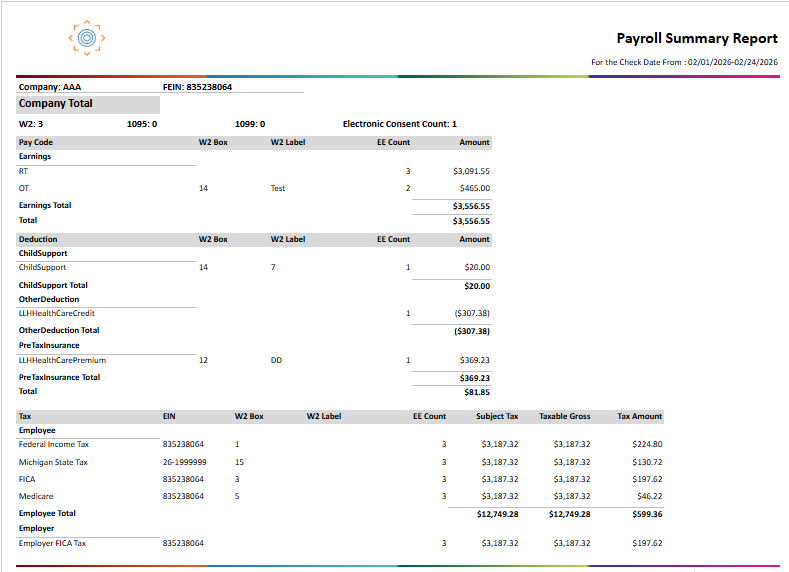
Report Details
Category | Value |
Parent Category | Back Office |
Category | Payroll |
Report Type | Paginated |
Report runs from Application | RMS |
Report Category: | Shareable |
Report Level | Payment |
Report Parameters
Report Parameter | Description | Parameter Options | Default | Required |
Date Type | Filters records by the type of date selected | Check Date / Accounting Period Date | Check Date | Yes |
Start Date | Filters records by the Date Type parameter from this date | Yes | ||
End Date | Filters records by the Date Type parameter to this date | Yes | ||
Company | Filters results to selected company | List of companies present that a user has access | All | No |
Group By | Groups records by the option selected | Company / Office | Company | Yes |
Tax Type | Filters whether to show Employee taxes, Employer taxes, or both | Both / Employee Tax / Employer Tax | Both | Yes |
To Include | Selects the data categories to include in the report | All / Pay Code / Deduction / Contribution / Tax / Accrual | All | Yes |
Person | Filters report to a specific employee by Person Id. Shows employee name in report header when used. | Free Text to enter numeric Employee Id | 0 (All) | No |
Report Grouping
Company
Office
The report is grouped first by Company (Back-Office Organization), then optionally by Office within each company, depending on the Group By parameter selected.
Report Columns
Report Column | Description | Definition/Logic |
Pay Code | Code identifying the type of transaction (earning, deduction, contribution, etc.) | Earnings: Total pay from regular earnings, based on posted payments. Deductions: Total amounts subtracted, like taxes or other adjustments. Contributions: Total amounts added for benefits, like retirement or insurance contributions. |
W2 Box | W2 form box number associated with this pay code, deduction, contribution, or tax | Shows the W-2 box where the amount will appear for year-end reporting. Items marked as Box 99 are for internal processing and won’t show on employee W-2 forms. |
W2 Label | Label displayed in the W2 box for this pay code, deduction, contribution, or tax | Shows the label or description used on the W-2 form (Box 14). If a custom label isn’t set for the item, it will use the local or city tax name instead. |
EE Count | Number of distinct employees with transactions for this item in the period | Shows the number of employees with activity in each category. Earnings: Counted from payroll items. Deductions: Counted from adjustments like taxes or other withholdings. Contributions: Counted from benefits like retirement or insurance. Taxes: Counted from payroll taxes (employees only). Accruals: Counted from accrual records, like vacation or sick time. |
Amount | Total monetary value for the pay code, deduction, or contribution in the period | Shows totals for each category, with negative amounts in parentheses. Earnings: Total pay from payroll items Deductions: Total amounts subtracted (like taxes or adjustments) Contributions: Total amounts for benefits |
EIN | Employer Identification Number associated with the tax | Shows which tax ID is used for reporting taxes. State taxes: Uses the organization’s state EIN. Federal taxes (FIT, FICA, Medicare, FUTA): Uses the organization’s federal FEIN. |
Subject Tax | Total wages subject to this tax before limits | Shows all wages counted for the tax before applying annual caps |
Taxable Gross | Total wages taxed | May differ from Subject Tax if there’s a wage cap (e.g., FUTA, SUI) |
Tax Amount | Total tax withheld or owed | Employee taxes appear as negative (withheld from pay); employer taxes as negative (liability). Zero-tax rows are excluded |
W2 Count | Number of W-2 forms needed | Calculated based on state/local taxes per employee |
1095 Count | Number of employees with ACA data | Counts employees with Affordable Care Act records for the period |
1099 Count | Number of contractors with earnings | Counts contractors with positive gross wages for the period |
Electronic Consent Count | Number of employees opting for e-W2 | Shows employees who agreed to receive W-2 electronically |
Accrual Plan | Name of accrual plan | e.g., “MI Sick Leave” |
Accrued | Total hours or units earned | Sum of accruals for the period |
Deplete | Total hours or units used | Sum of hours or units used during the period |
Balance | Net accrual balance | Can be negative if more accrual was used than earned in the period |
Carry Over Adjustment | Adjustments due to carry-over rules | Positive adds to balance, negative reduces it |
Manual Adjustment | Adjustments made manually | Positive adds to balance, negative reduces it |
Additional Notes
Employee taxes (FIT, FICA, MEDI, SIT, local) and Employer taxes (Employer FICA, Employer Medicare, FUTA, SUI) are shown in separate sub-sections. The Tax Type parameter controls which sub-sections appear. |
Accrual data is sourced from payment-level records, not employee lifetime records. This means the report reflects accrual activity that occurred within the selected date range only. |