Summary
The Deduction Submittal by Office Report provides office-level deduction submittal details for selected payroll checks or date ranges. It shows deduction line items alongside employee check details, employer information, and agency information so teams can prepare and validate deduction submittals.
This report is essential for:
Payroll Teams: preparing and validating deduction submittal packets by office.
Finance Teams: reconciling deduction line amounts with check and bill context.
Operations Staff: confirming the correct employer and agency details are attached to each payment group.
This report helps reduce manual lookup work by combining payment, deduction, employer, and agency information in one output.
Report Overview
Attribute | Details |
Purpose | Produces office-based deduction submittal data grouped by payment, including employee, employer, and agency sections. |
Classification | Payroll / Submittal Report |
Who Should Use This Report | Payroll Teams, Finance Teams, Back-Office Operations |
Business Problem Solved | Eliminates manual assembly of deduction submittal details across multiple payroll records and entities. |
Run Frequency | On-demand (per payroll cycle, correction cycle, or audit request) |
Related Reports | Deduction by Agency, Deduction Summary, Payment Deduction |
Business Value
Category | Description |
Office-Level Control | Supports office-specific deduction submittal preparation and review. |
Complete Submittal Context | Combines line items with employer and agency address details required for submission workflows. |
Reconciliation Support | Includes check numbers, references, and amounts to speed reconciliation and exception handling. |
Flexible Filtering | Supports run by payment batch or by date range and date type selection. |
Operational Accuracy | Reduces risk of missing required deduction submittal fields when assembling packets. |
Known Issues or Limitations
Issues | Description |
Billing-only scope | Only billed payroll records are included in this report output. |
Date filter behavior | Date filtering changes based on selected Date Type (Check Date vs Accounting Period Date). |
Deduction type dependency | Results depend on selected deduction type values; restrictive selection can omit expected rows. |
Payment linkage dependency | If deduction linkage records are incomplete, some expected rows may not appear. |
Office scope by user access | “All” company/office filters resolve within the current user’s access scope. |
Troubleshooting Guide
Issues | Problem Reason | Solution |
No results returned | Filters, date range, or payment batch do not match billed payment records. | Confirm Payment Batch, Date Type, and date range; retry with broader filters. |
Expected office data missing | Office is outside selected filter scope or user access scope. | Verify office selection and user office access, then rerun. |
Deduction rows appear incomplete | Deduction type filter excludes some transaction types. | Select all deduction types (or broader selection) and rerun. |
Employer or agency details missing | Underlying organization address/profile data is incomplete. | Update organization address/profile details and rerun the report. |
Check detail mismatch | Related payment linkage for adjustment/benefit row differs from expectation. | Validate associated payment and adjustment/benefit records for the item. |
FAQ
Questions | Answers |
What is the main output structure? | The report is grouped by payment, with nested payment line data, employer details, and agency details. |
Can this be run for a single payroll batch? | Yes. Enter a specific Payment Batch ID to return billed payments for that batch. |
What happens if no company or office is selected? | Blank values are treated as “All” and resolved from the user’s accessible companies/offices. |
Can I filter by deduction type? | Yes. You can select one or multiple deduction types, or run with all types. |
Why are only billed payroll records included? | The report is designed for deduction submittal workflows tied to billed payroll data. |
Reference Video/Screenshot
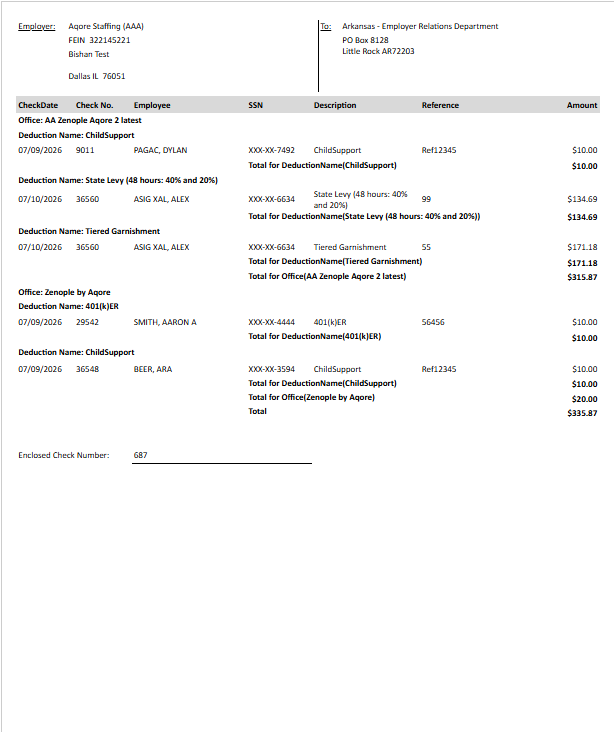
Report Details
Category | Value |
Parent Category | Back Office |
Category | Payroll |
Report Type | Paginated report |
Report runs from Application | RMS |
Report Category | Shareable |
Report Level | Payment Adjustment |
Report Parameters
Report Parameter | Description | Parameter Options | Default | Required |
Payment Batch ID | Runs report for a specific payroll batch when greater than zero. | Numeric ID | 0 | No |
Date Type | Chooses date basis for filtering when Payment Batch ID is not provided. | Select list (Accounting Period Date, Check Date) | Accounting Period Date | Yes |
Start Date | Beginning date for filtering eligible billed payments. | Date picker | — | Conditionally required (when batch not provided) |
End Date | Ending date for filtering eligible billed payments. | Date picker | — | Conditionally required (when batch not provided) |
Company | Limits to selected company values in user access scope. | Multi-select / All | All | No |
Office | Limits to selected offices under company/user scope. | Multi-select / All | All | No |
Deduction Type | Limits output to selected deduction transaction type(s). | Multi-select / All | All | No |
Report Grouping
Report Columns
Report Column | Description | Definitions/Logic |
Employer | Employer organization name for the payment context. | Derived from employer organization tied to the bill office. |
Employer FEIN | Employer tax ID used in submittal context. | Taken from employer organization. |
Employer Address Fields | Employer address components (address lines, city, state, ZIP). | Pulled from employer organization current address records. |
Agency | Agency organization name for the payment context. | Derived from agency organization tied to the bill. |
Agency Address Fields | Agency address components (address lines, city, state, ZIP). | Pulled from agency organization current address records. |
Office | Office name associated with the related payment record. | Taken from office linked to the payment identified for the line. |
Deduction Name | Deduction transaction code/name. | Derived from transaction code mapped to each deduction line item. |
Check Date | Date of the enclosed check/payment. | Pulled from payment batch check date and formatted for output. |
Check Number | Check number associated with the deduction line. | Derived from linked payment records for the adjustment/benefit line. |
Employee | Employee display name tied to the deduction line. | Taken from the employee/person linked to the adjustment or benefit item. |
SSN | Employee SSN value shown with the deduction line. | Returned from employee profile data tied to the line item. |
Reference | Deduction reference value for the line. | Derived from the linked adjustment/benefit reference data. |
Amount | Deduction amount for the line item. | Taken from the transaction item pay value for the deduction row. |
Enclosed Check Number | Check number included for submittal context. | Taken from the payment record associated with the deduction line. |
Additional Notes
If Payment Batch ID is greater than zero, the report uses that batch directly and does not depend on date filtering logic. |
If Payment Batch ID is zero, Date Type controls whether Accounting Period Date or Check Date is used to select billed payments. |