Summary
The Deduction by Agency Report shows employee deduction records grouped by agency within a selected date range. It helps payroll and back-office teams review deduction activity by check and employee, including agency, company, office, deduction reference, and deduction amount.
This report is essential for:
Payroll Teams: reconciling deduction amounts by agency before and after payroll processing.
Finance Teams: reviewing deduction totals and validating downstream posting expectations.
Operations and Compliance Staff: auditing employee-level deduction records by period and agency.
By consolidating deduction rows with employee identity, check details, and mailing address fields, this report supports quicker validation and exception follow-up.
Report Overview
Attribute | Details |
Purpose | Lists employee deduction records by agency for a selected period and filters. |
Classification | Payroll / Operational Report |
Who Should Use This Report | Payroll Teams, Finance Teams, Back-Office Operations, Compliance Staff |
Business Problem Solved | Reduces manual effort to trace deduction amounts by agency across employees and checks. |
Run Frequency | On-demand (typically per payroll cycle, period close, or audit request) |
Related Reports | Deduction Summary, Payment Deduction |
Business Value
Category | Description |
Agency-Level Visibility | Shows deduction activity by agency in one export-ready output, improving transparency. |
Faster Reconciliation | Provides check-level detail needed to verify deduction amounts and references quickly. |
Employee Traceability | Includes employee identifiers and address details to support issue resolution and correspondence workflows. |
Filtered Access Scope | Uses user-level access scope for company and office filters, keeping results relevant and secure. |
Audit Support | Captures the key deduction fields needed for internal reviews and period-end checks. |
Known Issues or Limitations
Issues | Description |
Agency name required in source data | Records without an agency name are excluded from the result. |
Date field selection changes output | Results depend on whether the user selects Check Date or Accounting Period Date. |
Address fields may be incomplete | If employee address data is missing or partial, address columns may appear blank or incomplete. |
Office and company filter behavior | Blank company/office/agency filter values are treated as “All”. |
SSN display format | SSN is returned as available in report data and may not always appear masked in all environments. |
Troubleshooting Guide
Issues | Problem Reason | Solution |
No rows returned | Selected filters or date range do not match available deduction records. | Verify date range and filter selections; retry with broader filters. |
Expected agency missing | Records with blank agency values are excluded, or agency filter excludes it. | Confirm agency exists in source records and that the agency filter includes it. |
Employee address looks incomplete | Employee profile address fields are missing or partially filled. | Update employee address details, then rerun the report. |
Totals seem lower than expected | Date type or filter scope excludes some records. | Re-run with the alternate date type and validate company/office scope. |
Cannot find a specific employee | Employee has no matching deduction row in the selected period or filters. | Confirm check period and deduction reference, then rerun with wider criteria. |
FAQ
Questions | Answers |
What does this report list? | It lists employee deduction rows by agency with check, company, office, employee, and amount fields. |
Which date field does the report use? | It uses the date type selected by the user: Check Date or Accounting Period Date. |
Can I run this for all companies and offices? | Yes. Leaving filters blank (or selecting all) returns results for all accessible companies and offices. |
Why are some deductions not shown? | Rows with no agency name are excluded, and selected filters/date range may also exclude rows. |
Is this report employee-level or summary-level? | It is employee-level and check-level detail, not a single summary row. |
Reference Video/Screenshot
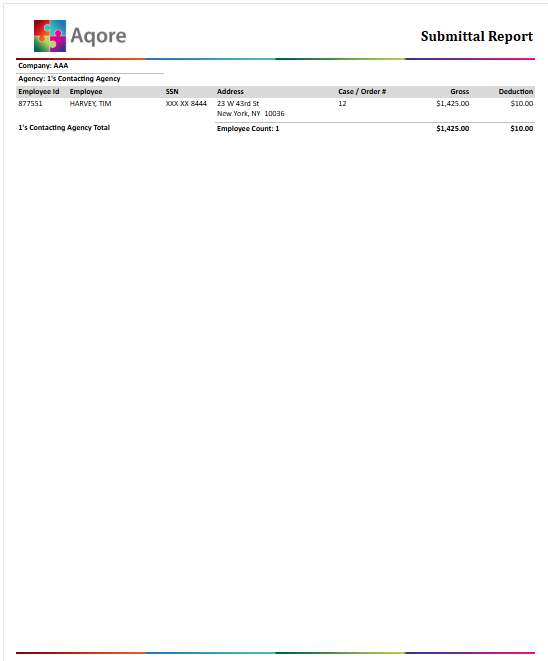
Report Details
Category | Value |
Parent Category | Back Office |
Category | Payroll |
Report Type | Paginated report |
Report runs from Application | RMS |
Report Category | Shareable |
Report Level | Payment Adjustment |
Report Parameters
Report Parameter | Description | Parameter Options | Default | Required |
Date Type | Chooses which date field drives filtering. | Select list (Check Date, Accounting Period Date) | Check Date | Yes |
Start Date | Beginning date for report filtering. | Date picker | — | Yes |
End Date | Ending date for report filtering. | Date picker | — | Yes |
Company | Limits results to selected companies in the user’s access scope. | Multi-select company list / All | All | No |
Office | Limits results to selected offices within selected company scope. | Multi-select office list / All | All | No |
Agency | Limits results to selected agencies. | Multi-select agency list / All | All | No |
Report Grouping
Company
Agency
The report will be grouped by Company and Agency by default.
Report Columns
Report Column | Description | Definitions/Logic |
Employee ID | Employee identifier. | The identifier of a employee associated with the payment. |
Employee | Employee display name. | Name of an employee associated with the payment. |
SSN | Employee SSN value in report output. | Social Security Number of an employee present in payment records. |
Gross | Gross amount associated with the payment. | Total gross amount associated with the payment |
Deduction | Deduction adjustment amount. | Total deduction amount associated with the payment adjustment. |
Company | Company name/alias. | Taken from company information on the payment detail. |
Agency | Agency name associated with the deduction. | Pulled from agency-linked payment details. |