Summary
The Sales by State and City Report shows billed totals, key payroll-related costs, gross profit, and worker counts grouped by company, state, and city. It is designed to help staffing and finance teams compare geographic performance in one view.
This report uses finalized payroll transaction data for the selected accounting period range and includes both current and archived finalized records. It gives a consistent location-based financial snapshot for analysis and planning.
This report is essential for:
Finance teams: review revenue and profit performance across states and cities.
Operations leaders: compare geographic markets and identify where margins are strongest or weakest.
Payroll managers: monitor major payroll cost components tied to each location.
Regional managers: validate local performance and staffing impact by city.
The key business outcome is faster geographic profitability insight to support pricing, growth, and cost-control decisions.
Report Overview
Attribute | Details |
Purpose | Provides location-based sales and profit totals by company, state, and city. |
Classification | Financial Report |
Who Should Use This Report | Finance teams, Operations leaders, Payroll managers, Regional managers |
Business Problem Solved | Helps teams understand where revenue and profit are concentrated geographically and where performance needs attention. |
Run Frequency | Monthly and on demand |
Related Reports | Gross Profit Report, Gross Profit by Customer Report, Sales Summary Reports |
Business Value
Category | Description |
Geographic Profitability Visibility | Shows profitability by location so teams can compare markets clearly. |
Better Territory Decisions | Supports expansion and optimization decisions using state and city performance. |
Cost Awareness | Displays major payroll-related cost components alongside billed totals. |
Archived Data Coverage | Includes historical finalized data in addition to current finalized records. |
Workforce Impact Insight | Adds worker count by location to help connect staffing scale with financial results. |
Known Issues or Limitations
Issues | Description |
Finalized records only | In-progress payroll activity is not included, so recent activity may appear lower until finalization. |
Accounting-period date scope | Results are filtered by accounting period dates, which may differ from other date views in other reports. |
Access-based company scope | Users only see companies they are allowed to access. |
Location fallback behavior | If a direct location link is unavailable, the report uses the company's current address location. |
Zero-value exclusion | Records with both billed total and pay total equal to zero are excluded. |
Troubleshooting Guide
Issues | Problem Reason | Solution |
No rows are returned | No finalized qualifying records exist for the selected accounting period range or company filter. | Expand the date range and confirm company selection and finalized activity. |
A company is missing | The user may not have access to that company, or the company has no qualifying records in scope. | Verify access permissions and run with broader filters. |
State or city looks unexpected | The report may use a fallback company location when a direct transaction location is unavailable. | Validate address setup for the affected company and related records. |
Totals differ from another report | The other report may use a different date basis, scope, or grouping level. | Align date type, filters, and report scope before comparing values. |
FAQ
Questions | Answers |
What does this report group by? | It groups data by company, then state and city. |
Does this report include archived data? | Yes. It includes both current and archived finalized records in the selected period. |
Which date filter does it use? | It uses the accounting period date range. |
What is GP Bill? | It is the report's gross-profit billing base used for profitability analysis. |
What does Employee Count represent? | It is the number of distinct workers included in each location grouping. |
Reference Video/Screenshot
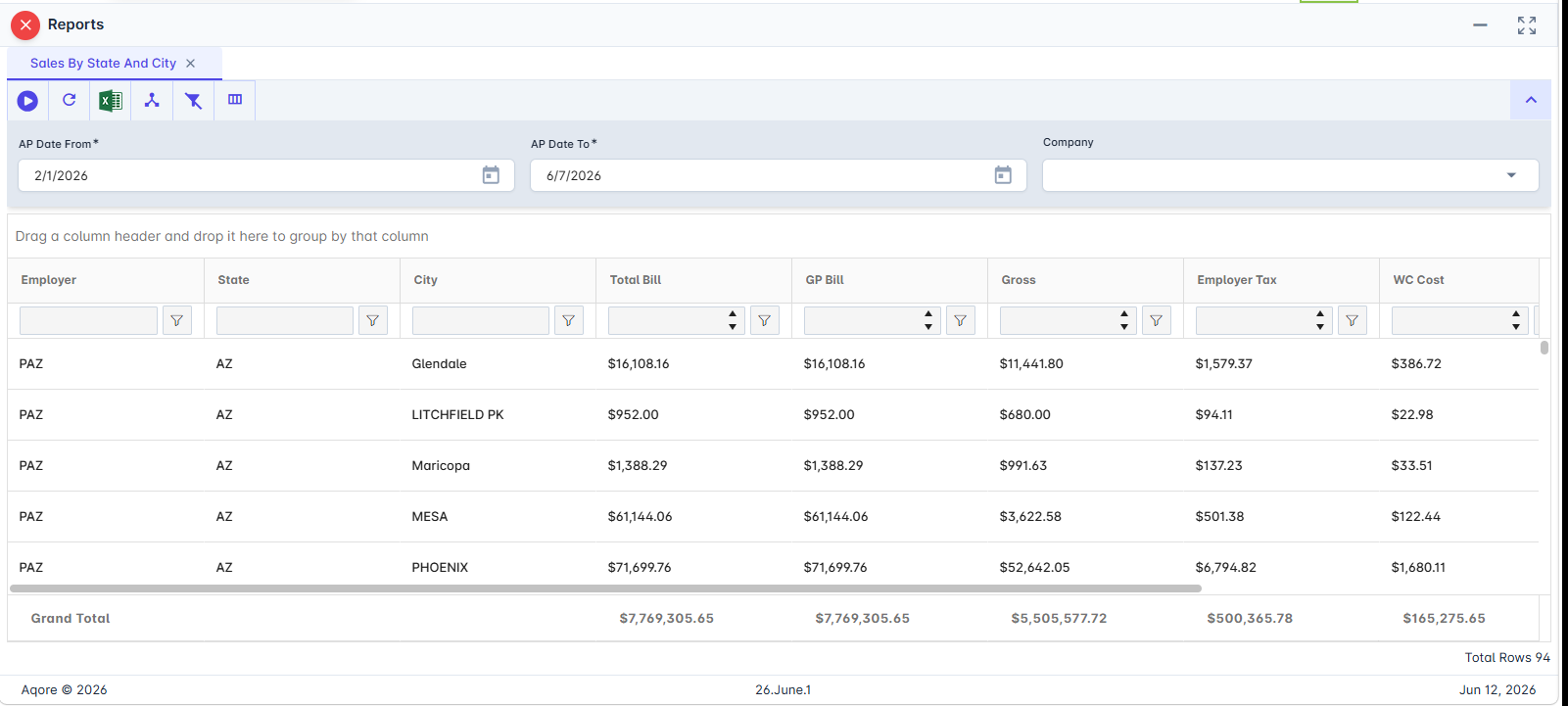
Report Details
Category | Value |
Parent Category | Back Office |
Category | GrossProfit/Transaction |
Report Type | Spreadsheet Report |
Report runs from Application | RMS |
Report Category | Sharable |
Report Level | Transaction |
Report Parameters
Report Parameter | Description | Parameter Options | Default | Required |
AP Date From | Start of the accounting period date range. | Yes | ||
AP Date To | End of the accounting period date range. | Yes | ||
Company | Limits the report to one or more companies in the user's access scope. | Multi-select list or All | All | No |
Report Grouping
The report does not have any grouping by default.
Report Columns
Report Column | Description | Definitions/Logic |
Employer | Reporting company alias. | Pulled from company setup used in report output. |
State | State code for the grouped location. | Taken from location data associated with each qualifying record. |
City | City for the grouped location. | Taken from location data associated with each qualifying record. |
Total Bill | Total billed amount. | Sums billed totals for qualifying records in each company-state-city group. |
GP Bill | Gross-profit billing base amount. | Calculated from billed components by adding sales, charges, and billing adjustments, then subtracting discounts. |
Gross | Total gross wage amount. | Sums gross values for qualifying records in each group. |
Employer Tax | Total employer tax cost. | Sums employer tax values for qualifying records in each group. |
WC Cost | Total workers' compensation cost. | Sums workers' compensation values for qualifying records in each group. |
Gross Profit | Total gross profit amount. | Sums gross profit values for qualifying records in each group. |
Employee Count | Number of unique workers in the group. | Counts distinct workers included in each company-state-city group. |
Additional Notes
Data is restricted to companies the user is authorized to access. |
The report includes both current and archived finalized data within the selected accounting period range. |
Records with no billed amount and no pay amount are excluded from results. The location shown may come from a fallback company location when a direct link is unavailable. |
This is a static grouped output intended for location-level financial analysis. |