Summary
The Cash Receipt Report provides finance and accounts teams with detailed visibility into customer payments, including payment amounts, methods, reasons, posting status, and Days Sales Outstanding (DSO).
Its standout capability is the Date Type parameter, which gives users flexible control over batch selection filtering by Accounting Period Date, Post Date, or Payment Date and the Payment Reason breakdown, which summarizes total cash collected by reason code within each company. This makes it possible to analyze collections from multiple financial perspectives in a single report run.
This report is essential for:
Accounts Receivable & Finance: reconciling posted cash receipts against invoices and accounting periods.
Billing & Collections Teams: analyzing payment behavior by method, reason code, and customer to improve collection strategies.
Management: monitoring DSO trends at the company level and forecasting cash flow performance.
By using this report, staffing companies gain a complete, auditable view of all posted cash activity enabling faster period-end closing details, more accurate AR records, and stronger customer payment accountability.
Report Overview
Attribute | Details |
Purpose | Provides detailed and summary views of cash receipts, including payment amounts, payment methods, payment reasons, DSO, and company/office totals. Links receipts to invoices and accounting periods for accurate reconciliation. |
Classification | Business-Critical Report |
Who Should Use This Report | Accounts Receivable, Finance and Accounting, Billing, Collections |
Business Problem Solved | Improves visibility into posted cash receipts, supports cash reconciliation, enables DSO tracking, and helps identify payment trends across customers, offices, and companies. |
Run Frequency | Daily or weekly; also on demand for audits or period-end reconciliation. |
Related Reports | AR Aging, Invoice Register |
Business Value
Category | Description |
Cash Reconciliation | Confirms that posted cash receipts align with invoices and accounting periods by linking each payment to its AR batch, Post Date, and Invoice record. |
DSO Analysis | Measures payment timeliness by calculating days between Invoice Date and Date Received. Provides both individual and company-level average DSO to identify slow-paying customers. |
Payment Behavior Insights | Analyzes payment methods (Check, ACH, Credit Card) and reason codes (Full Payment, Partial, Write-Off) across customers and offices to reveal collection patterns and trends. |
Operational Control | Supports collection strategies and cash flow forecasting by providing a structured breakdown of receipts by company, office, customer, and reason code. |
Audit Support | Provides a complete audit trail from batch ID through to individual invoice payments, with posting dates and references — enabling rapid reconciliation for period-end close. |
Known Issues or Limitations
Issues | Description |
Posted batches only | Only AR batches with a valid payment batch post date are included in the report. Unposted or in-progress batches are excluded regardless of date range. |
Payment Date filter applies a two-step exclusion | When Date Type = Payment Date, batches are first selected by whether any payment falls in the range, then individual rows outside the date range are deleted. This means a batch may be partially included. |
DSO can be negative | If a payment is received before the invoice date (e.g., advance payment or data entry error), the DSO will be negative. This is mathematically correct but may indicate a data issue. |
Access-scoped data | The organizations and offices returned are restricted to those the logged-in user has access to via Person Data Access. Users with limited access will see a subset of data. |
Troubleshooting Guide
Issues | Problem Reason | Solution |
Missing receipts when using Payment Date | Individual receipt rows whose Date Received falls outside the Start/End range are removed after batch selection. | Verify that the payment dates on the missing receipts fall within the selected Start and End Date. Use Post Date mode if you want all receipts in a posted batch regardless of individual payment dates. |
Unexpected or very high DSO values | DSO is calculated from Invoice Date to Date Received. If either date is incorrect on the underlying record, the DSO figure will be skewed. | Cross-check Invoice Date and Date Received on the underlying invoice and AR batch records to ensure both are accurate before interpreting DSO. |
Payment totals appear lower than expected | Reason Code or Payment Type filter is restricting the result set. | Set Reason Code and Payment Type to 'All' to remove those filters and compare the unfiltered totals against your expected values. |
FAQ
Questions | Answers |
What does the Date Type parameter control? | Date Type selects AR batches by Accounting Period Date, Post Date, or Payment Date. Payment Date also removes any payment rows outside the selected Start/End range. |
How is DSO calculated? | DSO is the number of days between the Invoice Date and the payment’s Date Received, calculated per receipt row and averaged at the company level. Higher DSO means slower customer payment; 0 means same‑day payment. |
Can I see totals by company and office? | Yes. The report produces summary totals at both Company level (Invoice Amt, Payment Amt, Customer Count, Invoice Count, Average DSO) and Office level (Invoice Amt, Payment Amt, Customer Count, Invoice Count). These totals appear as sub-total rows alongside the invoice-level detail rows. |
What happens if I enter a specific Batch Id? | When a non-zero Batch Id is entered, the report bypasses the Date Type and date-range batch-selection logic entirely and returns all receipts from that specific AR batch only. This is useful for auditing or reprinting a single batch. |
Reference Video/Screenshot
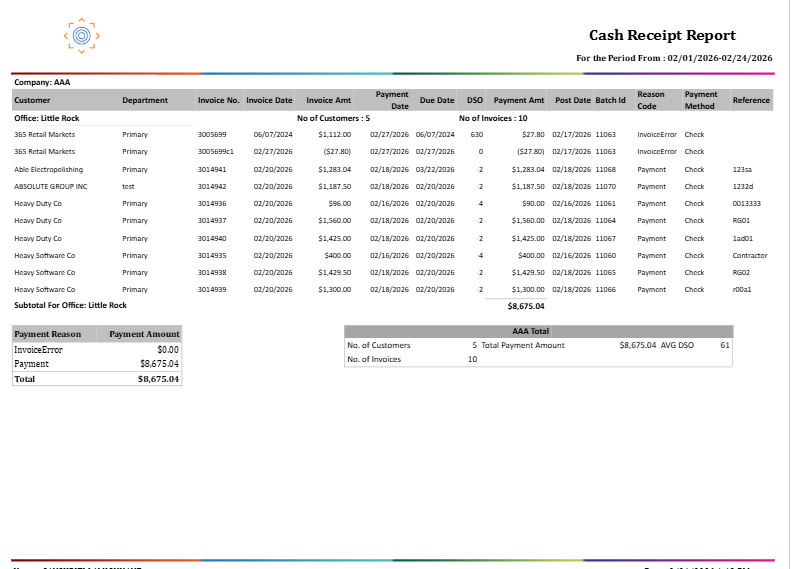
Report Details
Category | Value |
Parent Category | Back Office |
Category | Accounts Receivable |
Report Type | Paginated Report |
Report Runs from Application | RMS |
Report Category | Shareable |
Report Level | Account Receivable |
Report Parameters
Report Parameter | Description | Parameter Options | Default | Required |
AR Batch Id | Targets a single specific AR batch, bypassing all date-range and Date Type logic. | Free text to enter numeric Id | 0 | No |
Date Type | Drop down having date types to determine the date range scope of AR Batches | Accounting Period Date / Post Date / Payment Date | Accounting Period Date | No |
Start Date | Start of the date range applied to the selected Date Type. | Any valid date | Yes | |
End Date | End of the date range applied to the selected Date Type. | Any valid date | Yes | |
Company | Filters results to selected company | List of companies present that a user has access | All | No |
Office | Filters the results based on the office of the company selected | List of office belonging to a company that a user has access | All | No |
Customer | Filters receipt detail rows by the customer’s name. | Free text for Customer name. | % | No |
Payment Type | Filters receipt detail rows to specific payment methods (e.g., Check, ACH, Credit Card, Wire). | One or more Payment Method List, or All | All | No |
Reason Code | Filters receipt detail rows to specific payment reason codes (e.g., Full Payment, Partial, Write-Off). | List containing Reason Code for Payment | All | No |
Report Grouping
Company
Office
The Cash Receipt Report organizes data in a three-level hierarchy: Company → Office → Customer/Invoice detail rows.
Report Columns
Report Column | Description | Definition/Logic |
Company | Short alias (abbreviation) for the tenant organization. | The abbreviated name of the company responsible for issuing the invoice and managing the billing activities. |
Office | Name of the office associated with the invoice. | The office location associated with the invoice. |
Customer Name | Name of the customer who made the payment. | The name of the customer organization that submitted the payment. |
Department | Department associated with the customer's organization. | The business department within the customer’s organization |
Invoice Number | Unique identifier for the invoice the payment was applied against. | The unique number assigned to the invoice that the payment was applied to. |
Invoice Date | Date the invoice was issued. | The date the invoice was officially issued to the customer. |
Due Date | Date the invoice payment was due. | The date by which the customer was expected to make payment. |
Invoice Amt | Total amount billed on the invoice. | Represents the full invoiced value before any payments are applied. Finance charges are not included in this value. |
Date Received | Date the payment was received from the customer. | This is the date the cash receipt was entered, representing when funds were actually received. |
Posted Date | Date the AR batch was posted to the ledger. | The date when the AR Batch was posted. |
Payment Amt | Amount of this payment applied to the specific invoice. | Represents the portion of the Customer Organization Payment allocated to this invoice — not the total payment in the batch. |
Payment Method | Method used to make the payment (e.g., Check, ACH, Wire). | The financial channel used for the transaction. |
Reason Code | Reason code is associated with the invoice payment (e.g., Full Payment, Partial, Write-Off). | A category describing the nature of the payment, such as a full settlement, a partial payment, or a debt write-off. |
Batch Id | Identifier for the AR batch in which this payment was recorded. | The identifier of the accounting batch that contains this payment. Used for audit tracking and reconciling posted financial entries. |
Batch Type | Classification of the AR batch (e.g., Regular, Adjustment). | The type of accounting batch in which the payment was processed (e.g., regular payment, adjustment). |
Reference | Free-text reference entered when the payment was recorded (e.g., check number, wire reference ID). | Any additional reference text provided at the time of payment entry—such as a check number. |