Summary
The Statement Report provides a customer-level view of all outstanding invoices, helping finance, billing, and branch teams monitor unpaid balances and manage accounts receivable effectively. By organizing open invoices by customers and categorizing balances into aging buckets, the report makes it easy to identify past-due accounts, track payment behavior, and prioritize collection efforts.
Its standout feature is the flexible Include filter, which allows teams to view all invoices with outstanding balances, past-due only, or all invoices including zero balances, without running separate reports. Combined with the optional Unapplied Cash section, it ensures complete AR visibility in a single run.
This report is essential for:
Finance & Accounting: validating invoice balances, finance charges, and unapplied payments before financial close.
Payroll & Billing Teams: reconciling billing and accounts receivable totals.
Branch Managers: identifying overdue customer accounts and managing customer collection follow-ups.
By using this report, staffing companies gain complete visibility into accounts receivable, enabling faster collections, more accurate financial reporting, and stronger client payment accountability.
Report Overview
Attribute | Details |
Purpose | Provides a customer-level view of all outstanding invoices organized by the customer. It can be filtered for a specific customer, filtered to show only past-due invoices, or include all invoices with balances, with an option to include unapplied payments for accurate reconciliation. |
Classification | Business-Critical Report |
Who Should Use This Report | Finance and Accounting, Payroll and Billing Teams, Branch Manager |
Business Problem Solved | Helps monitor unpaid customer balances by clearly displaying all open invoices organized by the customer. Teams can quickly identify overdue accounts, prioritize collection efforts, and maintain accurate accounts with receivable records. |
Run Frequency | Weekly, bi-weekly, or monthly to review outstanding customer balances and enhance collection efforts. |
Related Reports | Customer Invoice Summary, Customer AR Payment, Client Billing |
Business Value
Category | Description |
Accounts Receivable Overview | Review outstanding customer balances by clearly displaying all open invoices grouped by customer, including invoice amount, amount paid, and balance due. |
Aging & Past-Due Analysis | Identify past-due accounts using aging buckets: Current, 1–30, 31–60, 61–90, and Above 90 days — so teams can prioritize collections effectively. |
Payment Behavior Monitoring | Assist branch managers and finance teams in monitoring customer payment behavior, tracking overdue trends, and reducing outstanding receivables. |
Customer-Level Financial Visibility | Provide customer-specific financial views by filtering the report for a single customer, past-due invoices only, all balances, or all including zero-balance invoices. |
Payment Reconciliation | Reconcile unapplied payments against outstanding invoices to ensure accurate accounts receivable reporting and prevent reconciliation gaps. |
Known Issues or Limitations
Issues | Description |
Statement Report does not reflect updated payment terms from the customer's service profile | When payment terms are updated in the Service Profile, previously issued invoices (e.g., originally showing Due on Receipt) do not automatically update to the new terms (e.g., Net 30). As a result, regenerated invoices and Statement Reports continue to display the outdated terms. |
Finance charges are not included in Invoice Amount | Finance charges are tracked separately. The Balance Due formula accounts for them (Invoice Amount + Finance Charge − Amount Paid), but the Invoice Amount column displays only the original billed amount. |
Troubleshooting Guide
Issues | Problem Reason | Solution |
Missing Invoice or Customer Data | Data visibility may be impacted by restrictive filters or limited user access. | Review the selected office and customer filters and confirm that you have the appropriate access to the relevant office or customer. |
Past Due values showing as negative | Negative past due days mean the invoice is not yet overdue — the due date is in the future. | Shows how overdue an item is. A negative number means it’s not due yet, zero means it’s due today, and a positive number means it is past due. It simply counts the days between the due date and today. |
Unapplied payment not showing | The 'Include Unapplied Cash' parameter is set to No. | Set the Include Unapplied Cash parameter to Yes to display unapplied payment amounts. |
Zero Balance invoices not visible | The Include filter may be set to All (balances only) or Past Due Only. | Change the Include parameter to 'All with Zero Balance' to include fully paid invoices in the report. |
FAQ
Questions | Answers |
Can I see a statement for just one customer? | Yes. Enter the Customer Id or Customer name parameter to filter the report to a single customer. The Customer Id takes precedence when provided. |
What is the difference between the three 'Include' options? | 'All' shows all invoices with an outstanding balance. 'All with Zero Balance' shows all invoices including fully paid ones. 'Past Due Only' shows only invoices where the due date has passed and a balance remains. |
How is the aging bucket determined? | Aging buckets are based on the number of days between the invoice Due Date and today. Current = 0 or fewer days past due; 1–30, 31–60, 61–90 = overdue ranges; Above 90 = severely overdue. |
Reference Video/Screenshot
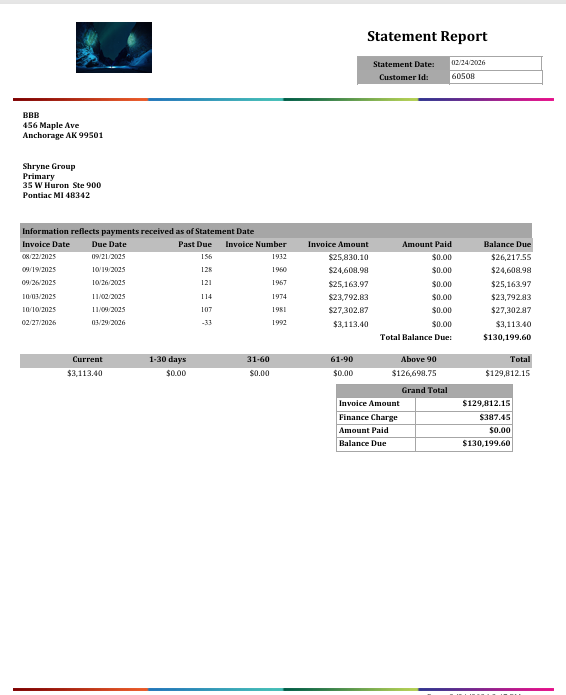
Report Details
Category | Value |
Parent Category | Back Office |
Category | Invoice |
Report Type | Paginated Report |
Report runs from Application | RMS |
Report Category: | Shareable |
Report Level | Invoice |
Report Parameters
Report Parameter | Description | Parameter Options | Default | Required |
Customer Id | Filters records by the internal Customer Id (Organization Id). When provided, it takes precedence over Customer name. | Free text to enter numeric value | 0 | Yes |
Customer | Filters records by customer name using a wildcard match. | Text wildcard | % | No |
Include | Determines which invoices are included in the report based on balance status. | All / All with Zero Balance / Past Due Only | Yes | |
Include Unapplied Cash | When enabled, the report shows a separate section per customer for payments received but has not yet applied to any invoice. | Yes / No | Yes | Yes |
Report Grouping
The report is not grouped, as the statement report is generated for a single client and includes only that client’s details.